

 CCMS Selfmonitoring Monitor for System-Wide Data
Use
The SAP CCMS Technical Expert Monitors monitor set contains the predefined CCMS Selfmonitoring monitor, which displays the status of the monitoring architecture and of the Alert Monitor. The monitor displays, among other things, whether the Alert Monitor was able to perform the following actions:
Both the
 CCMS agents and individual Alert Monitor methods (data collection methods and auto-reaction methods) can display problems and their status in the Selfmonitoring tree.
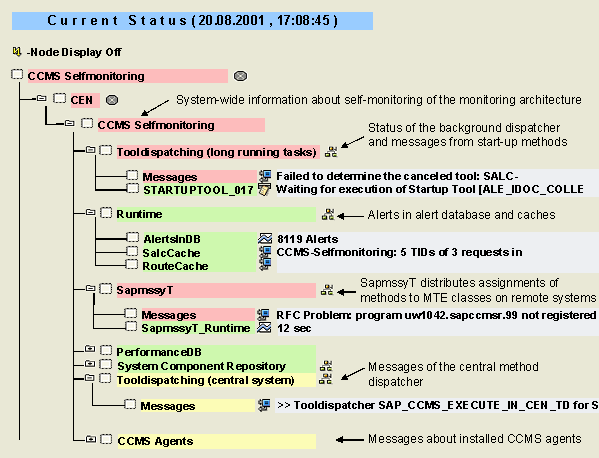

The monitor consists of multiple subtrees; on the one hand, the system-wide subtree with the title CCMS Selfmonitoring below the relevant system (in the example above, the system CEN), on the other hand, the instance-specific subtrees for the monitored servers and active CCMS agents (see
Features
The subtree consists of the following monitoring objects:
Methods can, among other things, run in dialog or in background processing. The latter can, depending on the definition of the method, be started by two different dispatchers:
Both dispatchers run system-wide centrally, rather than on each individual instance, which is why the associated monitoring object is in the system-wide subtree. The dispatcher messages are displayed under Messages.
Methods that are started by this dispatcher can add their own status MTEs, meaning that you can also find runtime and error messages here.
As the monitoring architecture is an infrastructure with a modular structure, problems in certain methods affect only certain MTEs. The majority of the monitoring functions of the monitoring architecture are not affected by method errors.
This performance attribute displays the total number of alerts in the alert database. When you
You can reorganize the completed alerts at any time using the analysis method assigned to this MTE, irrespective of alerts. When doing so, you can specify the date before which all completed alerts are to be deleted.
The monitoring architecture includes various caches in which the assignment of MTEs to
Contexts and segments of remote monitored systems are stored in this cache. You can also check this in the
SAPMSSYT is a data collection method of the monitoring architecture that runs as a job on the monitored systems. During its runtime, the job occupies a work process on the monitored system. SAPMSSYT runs once an hour.
The main tasks of SAPMSSYT are:
You can find SAPMSSYT messages under Messages; SapmssyT_Runtime gives the runtime of the job.
This subtree contains information about the performance database of the monitoring architecture. This database contains performance data that is collected and aggregated in accordance with the user’s specifications. The CollectionRuntime attribute displays the runtime of the job that runs daily to transfer the performance data to the database; CollectionMessage contains possible messages from this job.
This subtree contains the version of the
This subtree displays messages from the central method dispatcher (RSAL_CENSYS_TOOL_DISPATCHING) under Messages. This dispatcher makes central auto-reactions possible when alerts are triggered on remote systems. The process of this is as follows:
For more information about central auto-reactions, see SAP Note 0429265.
This subtree corresponds to the
Activities
To start the monitor, follow the procedure below: