

 Selfmonitoring CCMS Agents Monitor
Use
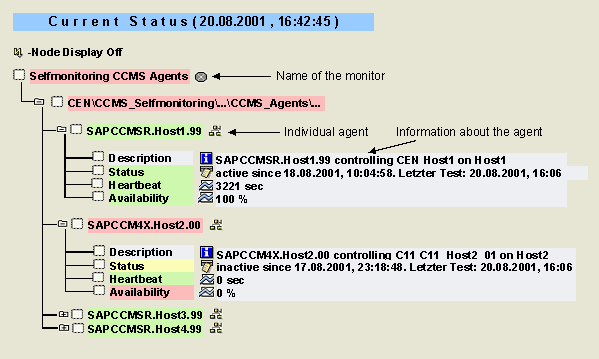
You can use this monitor to monitor the CCMS agents in your IT landscape. In addition to the RFC destination of the agent, the monitor provides the following information about each agent:
Features
There is a separate subtree for each individual
 CCMS agent (SAPCCMSR, SAPCM3X, SAPCCM4X), that provides data to the Alert Monitor of the monitored system. The name of the subtree is the same as the RFC destination of the agent and has the following structure:
<Type of agent>.<Name of host system>.<System number of monitored instance>
Each of these subtrees consists of the following monitoring tree elements (MTEs):
|
MTE |
Description |
|
Description |
Information about which application server on which host is monitored by the agent |
|
Status |
Information about whether the agent is active or inactive and how long it has been in that state |
|
Heartbeat |
Time since the last test of whether the agent is still active; if the agent is inactive, this attribute contains the value 0 sec |
|
Availability |
Percentage of the time in which the agent is active (by default in the last 15 minutes; you can change the time period in the Properties of the MTE class) |
Activities
To start the monitor, follow the procedure below: