

 Securities Account Transfer
Use
Within a company code, this function enables you to transfer positions at their book values from one securities account to another.
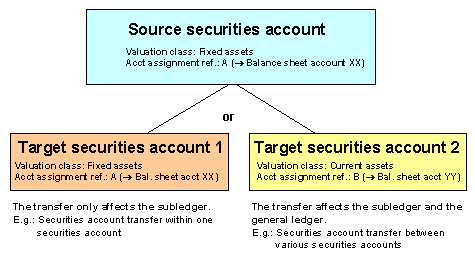
The securities account transfer can affect the general ledger as well as the subledger since, by changing the securities account for a position (= change in the subledger accounting), you can change both the valuation class and the account assignment reference, if the target securities account has a different account assignment reference in the position indicator to that of the source securities account (= changes in the general ledger accounts).
Overview: Securities Account Transfer in the Operative Valuation Area
Prerequisites
See also:
The prerequisites section in Securities Account Management
Features
The securities account transfer takes the transfer amount at book value from the source securities account and posts it to the target securities account. Depending on which position management procedure you use, the system generates the following flows:
Operative Valuation Area
Position Management Procedure |
|
Standard |
Securities account transfer within a securities account group Securities account transfer between different securities account groups Adjustment flows |
Net LAC / net SAC |
Securities account transfer within a securities account group
Securities account transfer between different securities account groups
|
Gross LAC / gross SAC |
Securities account transfer within a securities account group
Securities account transfer between different securities account groups
|
See also:
The Implementation Guide (IMG) documentation in the securities area under Accounting in Operative Valuation Area ® Valuation ® Assign Position Management Procedure.
Activities
The system proposes the current date as the default calculation date. You can overwrite this.

If you choose a posting date that differs from the calculation date, make sure that the posting date is not before the calculation date.
 Cash flow (source securities account). This displays how the cash flow of the source securities account would look after the securities account transfer has taken place. Cash flow (target securities account). This shows you how the cash flow of the target securities account would look after the securities account transfer has taken place.