

 Position Indicators in the Operative Valuation Area
Definition
The position indicator determines the position management and valuation parameters for a class at company code and securities account level in the operative valuation area.
It includes the valuation class, the position management procedure, the account assignment reference, the exchange for the valuation, as well as some position indicators such as custody type and asset grouping, and additional classifications for regulatory reporting.
See also:
ValuationUse
The position indicator determines how valuation is performed for a class at company code and securities account level.
If portfolio valuation is not activated, you can use the position indicator to manage the valuation parameters for a class if they differ from the Customizing settings for the company code and/or the product type.
Here, you can also maintain data (account assignment reference, valuation parameters) either for the company code position or, more importantly, for the securities account position.
The exchange selected in the position indicator is called up when you value the security. The system chooses the price from the price table that is valid at the exchange defined.
If you perform valuation at securities account group level, you assign the position of the class in the securities account to a securities account group in the securities account position indicator.
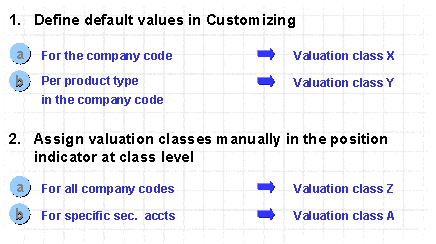
Overview: Assignment of Valuation Classes to Positions
Structure
General data
Additional Classifications (Regulatory reporting)
Integration
You can either enter position indicators manually or you can let the system determine them automatically when you purchase the security. If you want the system to determine the position indicator automatically, you have to define the following default values in Customizing:
You can change the valuation parameters for the company code provided that there are no planned records or actual records for the class in the company code.
You can change the valuation parameters for the securities account provided that neither planned records nor actual records exist in the company code, for the class, and for the securities account.

If you want to change the valuation parameters, even if the above requirements are not met, you can proceed as follows:
Create a new securities account, maintain the valuation parameters in the position indicator according to your requirements, and perform a securities account transfer. The change you make to the valuation parameters is effective for the position of the securities account transfer as of the key date of the transfer.
You cannot change the valuation parameters for positions that already exist.