 Period-End Closing
Use
You use the period-end closing function to close an accounting period for flows that affect positions.
It posts adjustment flows and realized price gains/losses that belong to a posted position-changing flow and have position value dates before the key date. In other words, period-end closing transfers flows from planned status to actual status.
Process flow for period-end closing:
...
1. Post flows for price gains and price losses.
2. Post adjustment flows (only if positions are managed for several securities accounts).
3. Close the positions.
After the period-end closing run, you cannot make any further postings affecting the position for a position value date that falls before the key date. If you do need post a flow after the period-end closing run, you must reverse all the flows that were posted since the posting date of the flow. It is important to reverse these flows in reverse chronological order.
Prerequisites
You cannot perform period-end closing if planned records exist for position-changing flows that have position value dates before the key date. In this case, you first have to post all the flows affected.

The planned records may include order execution items, or unposted order settlement items, interest payments, dividend payments, or redemption payments. You can exclude interest/dividend payments and redemption payments from period-end closing by deactivating the Note plan.int./div./repmnt indicator. The system then ignores the planned records.
Features
Selection
|
General Selections |
|
|
Company code |
|
|
Product type |
|
|
ID number |
If you do not select any ID numbers, the system uses the ID numbers in the securities accounts selected. |
|
Securities account |
Specify the securities accounts for which you want to carry out period-end closing. |
|
Portfolio |
You perform period-end closing for all securities accounts in a valuation group. You are offered a selection of portfolios, which are sometimes identical to the valuation groups. You can therefore opt to close the period for an ID number in selected portfolios within a company code. |
|
Closing Parameters |
|
|
Key date |
The key date limits the period for which you perform period-end closing. The function closes all the flows that match the selection criteria, have a position value date before or on the key date, and have not yet been closed. The default settings for the key date is the current date.
The period-end closing date does not have to coincide with the dates for opening and closing the posting periods in Financial Accounting. These activities can be carried out independently of each other. |
|
Note plan.int./div./repmnt |
This indicator prevents the period-end closing run from taking place if interest payments, dividend payments and redemption schedules in "planned" status exist.
This indicator is set as a default. |
|
Add securities accounts to groups |
You can only use this function for complete securities account groups for each ID number. If you set this indicator, the system automatically adds the missing securities accounts from the relevant securities account groups to the securities accounts selected. If you deactivate this indicator, and do not select all the securities accounts for a securities account group, the missing securities accounts are ignored.
If you performed a securities account transfer between securities accounts belonging to two valuation groups, you have to close both valuation groups together. Since the securities accounts that you want to close together do not necessarily belong to one valuation group, they are marked as a period-end closing unit (PEC-Un). If you set this indicator, you need only specify the two securities accounts involved in the securities account transfer. The other securities accounts that belong to the securities account groups are added automatically. |
|
Posting Control |
|
|
Posting date |
You can specify the posting date. All the postings are then assigned this date. |
|
Posting period |
|
|
Document date |
The document date is a required entry. The current date is entered as a default. |
|
Test run |
You can simulate the period-end closing run. In the test run, the system does not actually make any postings. Instead, it lists all the flows included in the period-end closing run.
The system does not check whether the account assignment reference has been maintained correctly for any FI postings that might be necessary. The Test run indicator is set as a default. To close the period in an update run, you must deactivate this indicator. |

 If you deactivate this
indicator, the interest payments, dividend payments and redemption payments
that have planned status are ignored by the period-end closing run. In this
case, you must ensure that no changes to the position are posted
retrospectively for this ID number (such as capitalizing the dividend).
If you deactivate this
indicator, the interest payments, dividend payments and redemption payments
that have planned status are ignored by the period-end closing run. In this
case, you must ensure that no changes to the position are posted
retrospectively for this ID number (such as capitalizing the dividend).
 Example:
Output
· List of the flows that were closed
The list header always contains the company code you are currently looking at.
A separate line is displayed for each new period-end closing unit (PEC-Un), containing information on the company code, the ID number and the period-end closing unit.
This is followed by all the corresponding flows that belong to the period you are closing, including the flows that have already been posted. In other words, you see all the flows whose position value date or due date falls after the last period-end closing date.
The period-end closing run also posts the adjustment flows and flows for price gains and losses in Financial Accounting. These flows are displayed in green and are marked with an asterisk. The portfolio to which the relevant securities account belongs is displayed at the end of each line. The PEC-Un field indicates which securities accounts are viewed as one unit for the period-end closing run. The PEC-Un is not numbered consecutively – some numbers are missing.
· Error log for valuation group
If necessary, an error log is generated for the ID number (Error log: Valuation groups). Each ID number has a separate error log.
¡ An "X" in the Plan column tells you that planned records still have to be posted.
¡ An "X" in the Selection column tells you that the selection was insufficient. In this case, you need to expand your selection criteria to include the relevant securities account in the period-end closing run.
¡ An "X" in the Amount column indicates that the amounts in position currency and local currency differ for some flows, even though the position currency and local currency are the same. The incorrect flows appear at the end of the list of planned flows that still have to be posted.
¡ A date in the Position inconsistent column shows that the positions are inconsistent on the date specified. You cannot perform period-end closing for this position.
· Error log for planned records that must first be posted
A list of the planned flows that still have to be posted appears below the Error log: Valuation groups section.
· List of flows with inconsistent amounts
The list contains the flows that have to be corrected. If the flows have already been posted, you have to reverse the posting and repeat it. If the flows have planned status, you have to update the cash flow.
· Posting log
The posting log is displayed if flows have been posted to Financial Accounting.
Result
· Adjustment records with "planned" status are converted into actual flows and passed on to FI.
· Realized price gains/losses with "planned" status are converted into actual flows and passed on to FI.
· If a flow affects a position, the system sets an internal flag to indicate that this flow has been closed. In the posting journal you can branch to the flow details. On the Technical data tab page, you can see whether or not a flow was closed.
Integration
· To execute an activity based on a particular securities position, you have to make sure that it is impossible to make changes at a later date that might affect the position retrospectively. Period-end closing prevents such changes from being made. You are therefore required to perform period-end closing before you can execute the following functions:
¡ Accrual/Deferral: You must perform period-end closing for the positions to be accrued/deferred.
¡ Valuation: You must perform period-end closing as at the valuation key date. You must wait until the valuation has been posted before you are allowed to perform the next period-end closing run after the valuation key date.
¡ Exercise of security rights: You must perform period-end closing for the class of the respective right.
¡ Corporate actions: Before you execute a corporate action you must perform period-end closing on the key date of the corporate action for all the relevant reference securities.
Do not carry out period-end closing after this key date for any security positions affected by the corporate action.
¡ Securities account transfer: You are required to perform period-end closing if you post positions to another securities account group during a securities account transfer.
¡ Balance sheet transfer: You must perform period-end closing for the key date of the balance sheet transfer for the positions in all the affected securities accounts and all the securities accounts valued together with the affected securities accounts.
· Additional information:
Sequence of the closing activities
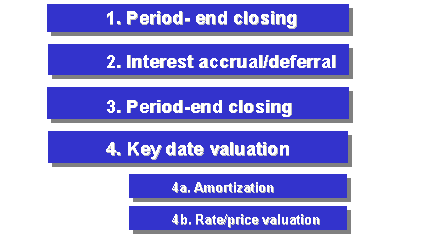
· If you need to enter flows that affect positions (such as purchases or sales) for the period you have just closed, you can use the function Reset Period-End Closing.
· You can display the flows from the last period-end closing run. See also: Display Last Period-End Closing Run
Activities
Choose Accounting ® Operative Valuation Area ® Period-End Closing ® Execute.
