Entering content frameProcedure documentation Exercising Subscription Rights Locate the document in its SAP Library structure

Use

You exercise Structure link subscription rights via the function Exercising Security Rights.

Integration

Overview: Capital Increase
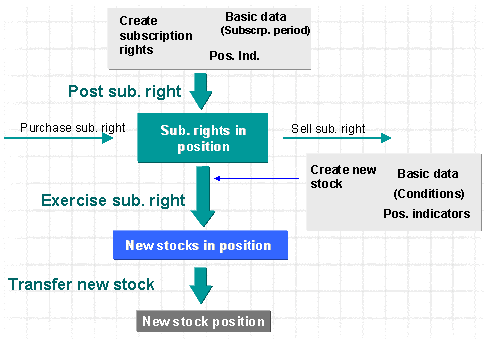
This graphic is explained in the accompanying text

You can use the following functions to perform the individual steps within this process:

Function

Prerequisites

Result

Posting Subscription Rights

( Corporate action)

The subscription rights that are issued from the old stocks are in the position.

The old stocks position is written down by an amount equal to the accounting value of the subscription rights, and the subscription rights position is posted.

Purchase/sell subscription rights, if required

The required number of subscription rights is in the position.

Exercising Subscription Rights

Exercising Security Rights

The new stocks are in the position.

Transfer new stock

( Corporate action)

When you transfer the new stock, it is automatically assigned the ID number of the old stock.

® New stock position.

Prerequisites

Procedure

  1. Choose Trading ® Security Right ® Exercise. This takes you to the initial screen.
  2. See also: Overview: Exercising Security Rights

  3. Make the following entries:
    1. Company code
    2. ID number of the subscription right
    3. Key date
  4. Confirm your entries by choosing (ENTER). In the Header data area, you can now see the data for the subscription right (especially the price, the period the subscription ratio) and for the new stock. .
  5. The data shown is read from the class data of both securities .

  6. In the Rights area , you can choose between different subscription periods if more than one exists .
  7. In the Position area, you can see the existing positions for the subscription right for each securities account on the key date .
  8. In the field Unit. to ex., you enter the number of subscription rights you wish to exercise . The default value is always the total number of subscription rights.
  9. You can enter Other flows for the automatically-generated incoming and outgoing flows for each securities account, or you can change the flows generated. You also have the option of maintaining the payment details for the payment flows.
  10. See also: Postprocessing Other Flows

  11. If all prerequisites are met and you have entered all the details for the exercise, you can carry out a test run .
  12. Once the test run has been successful, you can start the update run .
  13. The system generates a posting log .
  14. See also: Flows Generated when Exercising Security Rights

  15. If you have to reverse the exercise of the subscription rights, you can use the function Reversing the Exercise of Security Rights.

Result

When you exercise subscription rights, new stock is added to your position.. You post new stocks at the value of the corresponding subscription rights and the subscription price paid.

Leaving content frame