

 Approval
Use
You can use approvals to define certain rules or requirements that must be observed in Work Clearance Management. In addition, you can use approvals to log the execution of certain steps.
You can assign approvals to all
WCM objects. You always assign an approval at the header level of a WCM object; thus you approve the whole WCM object and not individual items. You always assign an approval at the header level of a WCM object; thus you approve the whole WCM object and not individual items.Before beginning the approval process you can assign approvals to a WCM object and delete these assignments again.
You can assign several approvals to a WCM object. However, each approval can only be used once per WCM object. You can also assign an approval to several WCM objects; however, on grounds of clarity, this is not recommended.
During the approval process you can issue approvals and revoke approvals again.

The approval process begins in that you set the
Integration
In Work Clearance Management, the approvals from the components Plant Maintenance and Customer Service are used. These approvals are enhanced for functions that only concern Work Clearance Management.
Prerequisites
In Customizing for the components Plant Maintenance and Customer Service you have defined approvals and approval categories. From the total quantity of these approvals you have selected a partial quantity for Work Clearance Management.
Features
In Customizing for the component Work Clearance Management (PM-WCM) you define which approval can be used for which WCM object. You make further settings, whose effects are described below.
Hierarchies
You can define hierarchies for approvals, to control the approval process within a WCM object.
The approvals on one hierarchy level are always connected by a logical AND. The issuing order is unimportant. This means that the approvals on one hierarchy level must always be completely issued, before an approval on the next hierarchy level can be issued.
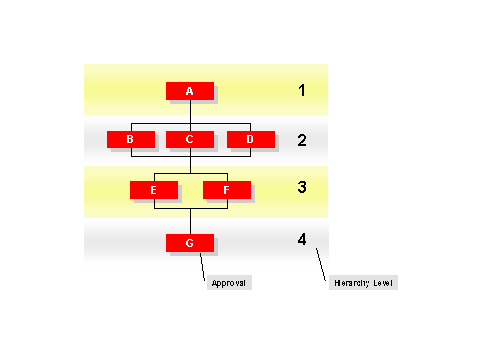

To issue approvals, B, C, or D, you must have issued approval A. To issue approvals E or F, you must have issued approvals B, C, and D. To issue approval G, you must have issued approvals E and F.
System Status and User Status
You can determine that the issuing of approvals can be blocked by the system or user status.
Assigning Another WCM Object
You can determine that an approval can only be issued when a WCM object is assigned to another WCM object.
Thus, you can, for example, prevent an Operational WCD from being approved before it is assigned to a work clearance application.
Automatic Assignment of Approvals
You can determine that an approval is automatically assigned to a WCM object when it is created.
For example, if you know that approvals A, B, and C are always used in the work clearance document, then in Customizing you can define that approvals A, B, and C are automatically assigned to the work clearance document when it is created.
Obligatory Approvals
You can determine that the assignment of an approval to a WCM object cannot be deleted. This makes the approval obligatory.
Automatic Issuing of Approvals
You can determine that approvals are automatically issued. This only makes sense if you have defined prerequisites (for example, system status) for issuing approvals.
Issuing an approval is dependent on a certain system status of the WCM object. As soon as the WCM object has the system status, the system automatically issues the approval.
Automatic Revoking of Approvals
You can determine that approvals issued on the basis of hierarchy level or a system status are automatically revoked.
Approvals A, B, and C, as well as D (see above graphic) have already been issued. Whoever issued approval A subsequently determines that approval A shouldn’t have been issued and revokes it. Through this, approvals B and C, as well as D, are automatically revoked.
Symbolization of the Approval Status
Progress in the issuing of approvals is symbolized by traffic lights. You can determine exactly which approval has an influence on the traffic lights. Through this you have, for example, in list overviews a quick overview of the progress of the approval process.
The colors of the traffic lights have the following meaning:
|
|
No approval is issued. |
|
|
At least one approval is issued. |
|
|
All approvals are issued. |
Approval Process Across WCM Objects
You can also block the approval process across WCM objects. Thus, approvals in
hierarchical or subordinate WCM objects can affect the issuing of approvals within a WCM object.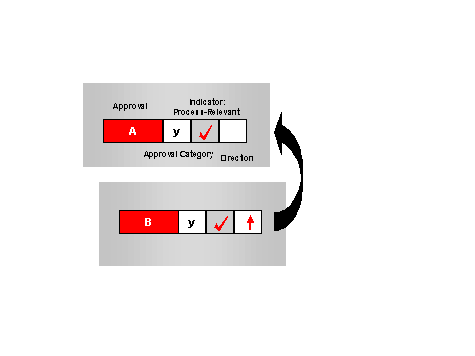
The following rules of exception apply:
|
Situation |
Exception rule |
|
The system is set up such that approval A of one WCM object waits for the issuing of approval B of another WCM object and the other way round. |
In this case, approvals A and B can be issued independently of each other, that is the blocking across WCM objects is lifted. |
|
Approval A is assigned to one WCM object, approval B is assigned to another WCM object. Approval B cannot be issued until approval A has been issued. The assignment of approval A to the WCM object is, however, deleted. |
In this case, the system interprets the missing assignment as approval issued. If you want to avoid this, you must determine that approval A is mandatory. |


