

 Archiving
Use
The archiving of loan document data is implemented within Loans Management in accordance with the specifications of the
 SAP Standard Archiving Solution (ADK) .The purpose of the archiving solution is to remove loan document data from the database when it is no longer needed in the SAP system, and to store it in archive files that can be displayed. The solution "reorganizes" the archived document data in such a way that the information needed for the further processing of the loans concerned stays in the system in the form of reorganization records. Because reorganization records are not documents you cannot reverse them.
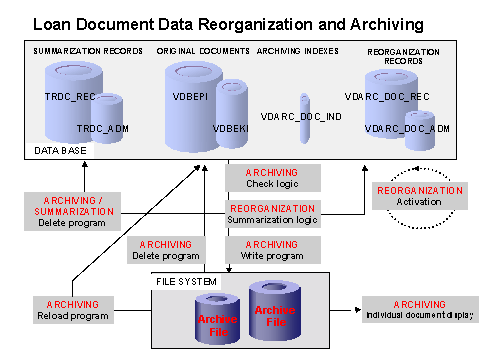
You should also note that loan document data that is less than two years old and still within the residence time cannot be archived. However, payments that are within the residence time but relating to debit or credit positions that are more than two years old can be archived up to a certain key date (Specified Key Date "Payment"). You must specify a key date that is least one year before the archiving run.
Integration
The archiving function is integrated into the overall Loans Management functionality.
Prerequisites
Functional aspects of the operational Loans Management system mean that you can only make the standard archiving
Customizing settings for the loan document data archiving function. Use the Archiving object CMLDOCUMNT - Loan Documents.
You can also make the necessary settings in the Loan Management Customizing under Tools ® Archiving.
Features
Certain criteria need to be fulfilled so that loan document data can be archived. After you start the archiving run, the system runs checks on the documents for the loans selected.
The archiving program checks whether the documents can be archived at document header and document item level and carries out a cross-document check for full clearing by payments, grouping by daybook or reference unit and reversal relationships.
If the check finds that one of the prerequisites has not been met for a document, the system does not archive the whole document. In this case the archiving key date is reset for the relevant loan.
Key Date Reset and Exclusions from Archiving
The standard date you specified for the loan document archiving is reset for the following document combinations:

Using the BAdI Reset Key Date, available in the Archiving Customizing for Loans Management, you can also reset the archiving key date and the specified "payment" key date for each loan.
The following documents are not archived within an archiving run:
Effects
When you implement the archiving function, a large number of loan functions are restricted for the respective archiving period because the archived original documents for Loans Management are no longer available. For example, the reorganization records are displayed in the cash flow with a special indicator but do not have the relevant calculation basis. In the account statement the reorganization records are displayed, selected by an icon, but it is not possible to display an individual document or an FI document. It is also not possible to calculate capital amounts within the archiving period.
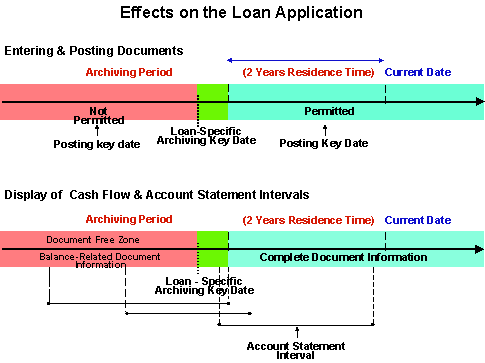
You need to be aware that there are some functional limitations, not only within Loans Management but also in connection with other components.
Authorizations
The authorization object T_CML_ARCH controls the operation of the different archiving programs (Write, Delete, Reload, and Display Archive). You can display this object in the menu under Tools ® Administration ® User Maintenance ® Information System ® Authorization Objects ® By Object Name, Text.
For more information, see
Authorization Check
You also need the following, general authorizations:
Create the authorizations using transaction PFCG.
Log
For every archiving program (archive, delete, reload) you can have the system display a standard log and an application log (via the report Evaluate Application Log - transaction SLG1) containing detailed information for each loan.
Functions
The following functions are available within loan document data archiving:
Activities
Choose Position Management ® Periodic Processing ® Reorganization ® Archiving.
If you want to use the general transaction SARA (also available under Tools -> Administration -> Administration -> Data Archiving) in which you have to enter the archiving object CMLDOCUMNT - Loan Documents, you need to be prepared for significant functional limitations. For this reason, execute the archiving functions using Loans Management.