

 Financial Statement Imbalances, Deferred Income Tax and Consolidation Unit Balance Adjustment
Use
It can be necessary for both manual and automatic postings to post financial statement imbalances, deferred income tax or consolidation unit balance adjustments. The system checks each manually or automatically generated posting documents whether a financial statement imbalance, deferred income tax or a consolidation unit balance adjustment needs to be posted and generates additional line items, if necessary.
With manual postings, we are talking of automatic line items as the system independently supplements your manually entered document line items with line items.
See following table:
Line items are generated... |
if these conditions are given |
For posting a financial statement balancing adjustment |
An entry between balance sheet and income statement accounts leads to an imbalance in the financial statements |
When posting deferred income taxes |
The given document type supports this feature, and the entry requires an adjustment for financial statement imbalances |
To clear imbalances in each individual consolidation unit when posting interunit entries |
The document type supports this feature, and requires a posting level greater than or equal 20 and selected FS items |
Features
You will find detailed explanations for financial statement imbalances, deferred income tax or consolidation unit balance adjustments in the subsequent sections of the Consolidation documentation. In this section functions are explained which are valid for all three kinds of additional line items.
Selected FS items
So that the system can generate individual line items for financial statement imbalances, deferred income tax and consolidation unit balance adjustments, you have to set the following in the Implementation Guide (IMG) of Consolidation:

You can set the selected FS items for deferred income taxes per document type and as a result override the settings, which you have executed in step Selected FS Items for Posting.
Subassignments for these Selected FS Items
The selected FS items for financial statement imbalances, deferred income tax and consolidation unit balance adjustments, which you have defined in the step selected FS items for posting or in the definition of document types, require a breakdown by
Subassignment according to the breakdown category.In Customizing you have various possibilities to control how the system determines the subassignments for the selected items:
Selected FS Items for Financial Statement Imbalances
For every selected FS item, which allows for one or more subassignment, you can set the indicator Default per subassignment and/or enter a you do not set the indicator. The following logic is valid in phases:
Exception: When it concerns an optional breakdown then you do not have to enter the characteristic value. The system then does not post the subassignment, instead it debits the null value.
The system goes forward step-by-step in order to determine the subassignment. The graphic shows these steps from a) to d):
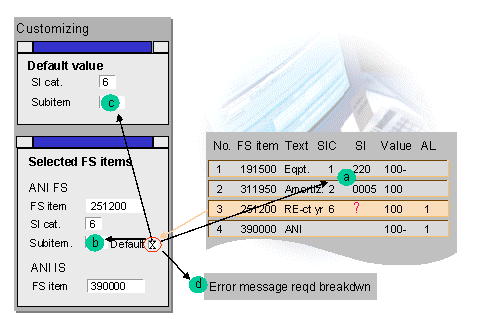
Explanations:
Step a), therefore the determination of the subassignment from the document is possible when:
Selected FS Items for Deferred Income Tax
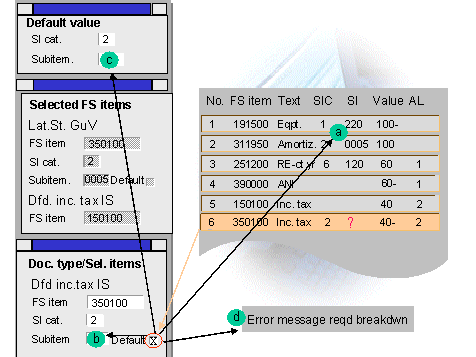
The logic how the system finds the subassignment for selected FS items of deferred income tax, is fundamentally exactly the same as the selected FS items for financial statement imbalances. The only difference is that you can define the selected FS items document type dependent. When posting the system first checks whether the selected FS items are maintained for the document type and defines the subassignments in the way which is explained above.
When the selected FS items are not entered per document type, then it gets the (global) settings in step
Define Selected FS Items for Posting and uses the logic there.
Selected Clearing Items
You maintain the selected clearing items per document type. The logic how the system determines the subassignments is the same as for the selected FS items for financial statement imbalances and deferred income taxes.
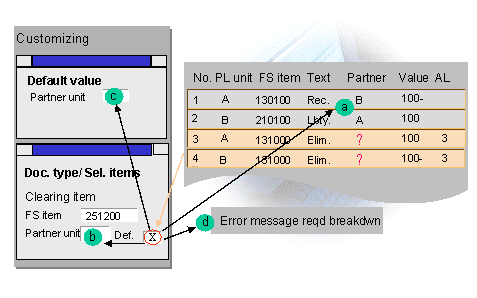
In the example in the graphic, the system can determine the partner assignment from the document in step a) and to be precise
The document is then divided into two shared documents for which the imbalance over all financial statement items is null.
Manual Posting: Help Functions for Automatic Line Items
Simulation
When you enter a posting document in the manual posting transaction, then the system generates the automatic line items while saving the document and subsequently updates the complete document in the database. Before saving the document you can simulate it. The system shows the automatic line items in the simulation. Therefore you can see beforehand whether and how the system will post financial statement imbalances, deferred income tax and/or consolidation unit balance adjustments.
Identification
The system marks the automatic line items with a special number in the document, so that you can differentiate them from your manually entered line items:
Field AUT |
Meaning |
1 |
Automatic line items for financial statement imbalances |
2 |
Automatic line items for deferred income taxes |
3 |
Automatic line items for cross-clearing cons units |
Entering Manually or Correcting Automatic Line Items
Instead of generating the automatic line items by the system, you can also enter these rows manually. You should note the following:
First you can simulate the automatic line items by the system and then change, for example change the subassignments or distribute the simulated values to several document line items.