Deferred Income Taxes
Use
Because of the tasks that are performed during consolidation, the consolidated earnings for the year usually differ from the sum of the earnings reported by the individual consolidation units. Deferred income taxes are posted within the consolidated financial statements, to adjust the sum of all reported tax expenditures to the consolidated earnings.
The system provides an option of automatically calculating and posting deferred income taxes.
Features
Deferred income taxes can arise from standardizing entries against the reported financial data of the consolidation units, or from consolidating entries.
In Customizing, you can activate the posting of deferred income taxes for each document type. You also define the tax rates for each consolidation unit, and the selected items for the allocation of deferred income taxes.
The system posts deferred income taxes provided you have activated the function in Customizing, and a financial statement imbalance occurs during an entry.
The financial statement imbalance is multiplied by the tax rate. The resulting deferred income tax is posted to the consolidation unit to which the financial statement imbalance itself is posted.
Example
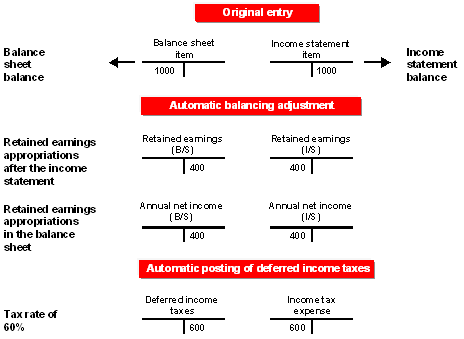
Assume that you post a standardizing entry against a balance sheet item. You use a document type which allows the posting of deferred income taxes. When the standardizing entry is posted, the balance sheet and the income statement are no longer in balance.
The following illustration shows you how the accounts are affected by the original entry, the automatic financial statement balancing adjustment, and the automatic entry for deferred income taxes.