Drilldown Reporting
Purpose
This component is a dialog-oriented information system which you can use to generate reports on the data in your SAP consolidation database.
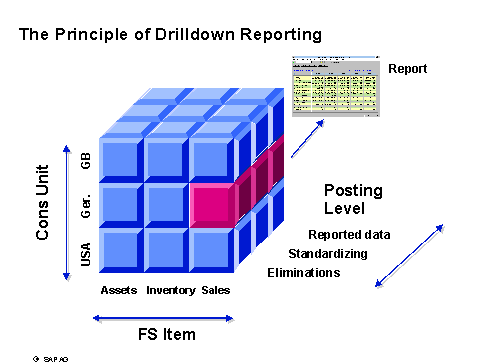
The component adheres to the principle illustrated below: For example, you can create report on the sales of individual consolidation units that differentiates between posting levels (reported financial data, standardizing entries, elimination entries).
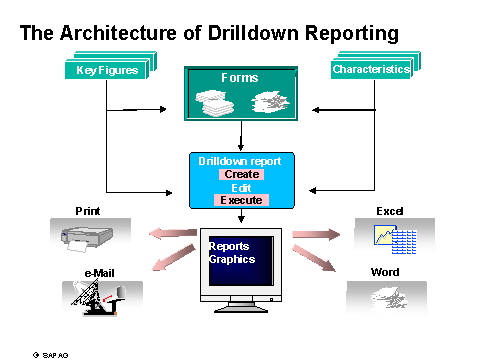
Drilldown reporting has been designed as follows: Using the forms, both the key figures and the characteristics become part of a drilldown report. After a drilldown report has been created, you can still modify it, for example to include different consolidation units. You can also "mail" the drilldown report or post-edit it in MS Office applications.
Implementation Considerations
Implement interactive drilldown reporting if you want to evaluate the data in your SAP Consolidation component according to various characteristics.
Integration
Many other components of the SAP System feature the functions of drilldown report. Under certain circumstances, the drilldown reports of different components can use the report/report interface to call each other interactively.
Features
You can use drilldown report layouts and output to create simple, data-driven reports as well as complex, formatted reports. Drilldown reports can reflect and analyze the data in your SAP System.
Drilldown reporting features easy-to-use functions for the following scenarios:
Interactive Editing of a Report
Navigation in the Database
Outputting and Sending Reports
Drilldown reporting in SAP Consolidation lets you use characteristics with special semantics: Custom characteristics, standard attributes and custom
attributes can serve as selection criteria as well as drilldown characteristics. For more detailed information, see the units Reference Characteristics and Hierarchy-related Options in Drilldown Reporting.You can use the characteristic totals consolidation group to define a selection criterion for consolidation groups in a form or report, thus specifying any combination of consolidation groups and units as a totals consolidation group.
 For more information, see the field help for the totals consolidation group.
Likewise, you can have totals items to easily define a selection criterion for financial statement items.
You can create global variables with an SAP Exit for certain standard characteristics, which simplify the handling of drilldown reports considerably. For more information, see the unit
Variable .You can manipulate the display properties of
hierarchies to the extent that the report proposes hierarchy names while selecting the hierarchies. This also simplifies the handling of interactive drilldown reports.