

 Hierarchy-related Options in Drilldown Reporting
Use
You use this function to portray hierarchies in drilldown reports to meet your individual reporting requirements.
Features
The purpose of hierarchy-related drilldown is to evaluate hierarchies using consolidation units or financial statement items, and to use different hierarchies as the basis for evaluating a specific snapshot of your data.
Hierarchy-related Drilldowns: Hierarchy of Consolidation Units
A hierarchy already exists in a dimension. This is differentiated as follows:
|
Case 1 |
Case 2 | |
A consolidation unit belongs to "n" consolidation group(s) in the hierarchy |
n = 1 |
n > 1 |
Accounting Technique |
all |
The consolidation unit is included fully or proportionately in only one consolidation group at the most; the unit can be included in other consolidation groups using the equity method or the mutual stock method. |
Display of Consolidation Unit |
The consolidation unit is shown only in the one consolidation group. |
The consolidation unit is shown only in the group that includes it fully or proportionately; the unit is hidden in all other groups. |

In all other cases an error message is displayed which reveals that the hierarchy assigned to the drilldown report is ambiguous. This is done because a consolidation unit has been included fully or proportionately in more than one consolidation group.
Example
Consolidation Unit |
Item |
Partner Unit |
Entry at posting level 00 (in group currency) |
Entry at posting level 20 |
A |
Receivables |
B |
100+ |
100– |
B |
Receivables |
A |
200+ |
200– |
A |
Payables |
B |
200– |
200+ |
B |
Payables |
A |
100– |
100+ |
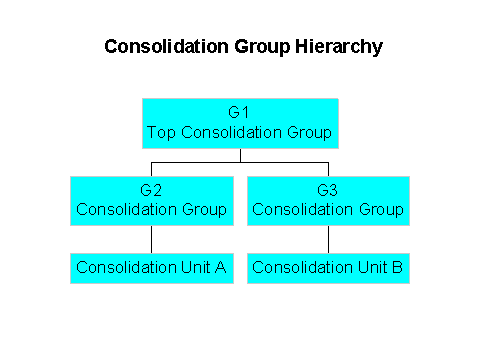
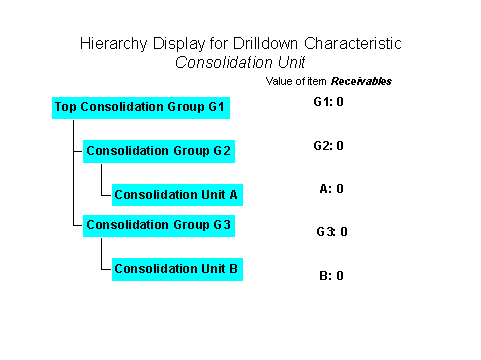
When the consolidation group is constructed as shown in the illustration, you could execute a Report 1 for the relationships shown above with the following parameters:
Item |
Receivables |
Totals Consolidation Group |
G1 |
Navigation Characteristic |
Consolidation unit with a hierarchy for G1 |
This report would have the following output:
Advantage
Disadvantages
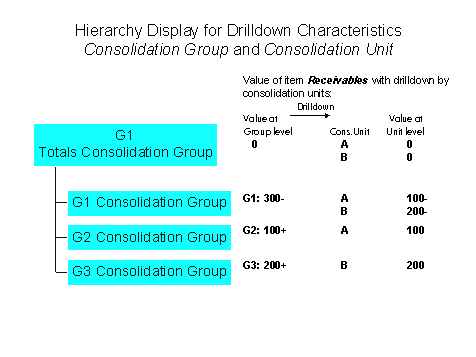
Alternatively, you could execute a Report 2 with the following parameters:
Item |
Receivables |
Totals Consolidation Group |
G1 |
Navigation Characteristics |
|
This report would have the following output:
Advantages
Disadvantage
However, it is possible to combine the drilldowns by consolidation group and consolidation unit in the printout of the report.
You can do this in Settings for Mass Printing under : Report ® Print layout ® Drilldown and Detail List ® Mass Print ® Settings. Change the sort sequence so that the consolidation group appears as the first characteristic, and the consolidation unit appears as the second characteristic. Make the consolidation unit the most detailed breakdown, and select No page break.
Hierarchy-related Drilldowns: Hierarchy of FS Items
You display the income statement with a hierarchy of financial statement items.
Option: Report Definitions

In a form, never use the characteristics FS item and totals item as selection criteria at the same time.
Hierarchy Variables
Hierarchy variables exist for totals consolidation groups and totals items. You can use hierarchy variables both in ad-hoc reports and form reports.
For more information, see
If you choose the hierarchy icon  for a characteristic, you must specify the desired hierarchy in another window.
Activities
As an example, we will define a drilldown report that compares the amounts in local and group currency. A hierarchy of consolidation units is to be displayed on the first screen. Note that the consolidation unit must be unambiguous in a report using local currency. This can only be achieved by defining two reports, and linking them via the
Report-Report Interface:Create a local variable for each of these general selections.
One column of the form displays the values in local currency, a second column displays the values in group currency.
Result
Using a hierarchy you can compare the amounts in local currency and group currency of consolidation units. Mark a cell with a consolidation unit and select the function Execute report.