

 Customizing Availability Monitoring
Use
You can customize
availability monitoring in a number of ways. You have the following options:Prerequisites
You have performed the
Installation of the Availability Agent CCMSPING.Procedures
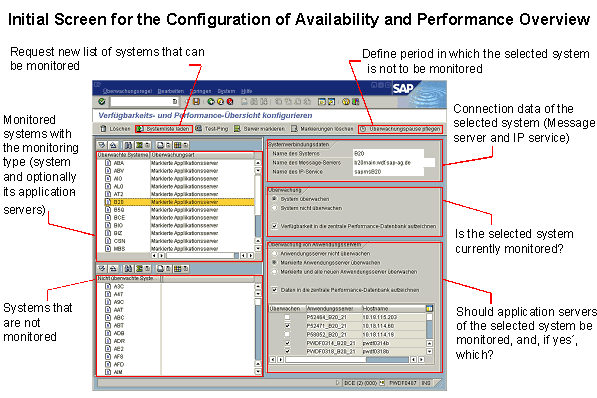

The configuration of the availability and performance overview is also set as the analysis method for the nodes of the
Add New Systems to the List of Systems that Can Be Monitored
On the Configure Availability and Performance Overview screen, choose Load System List ( ). If the desired system does not appear on the list, add the system to it manually (see
The SAPMSG.INI file, which is also used for functions of SAPLOGON, is uploaded from the frontend for the system list.
Activating and Deactivating System Availability Monitoring
Select the desired system in the Configure Availability and Performance Overview screen; you can find it either in the list of monitored systems or the list of systems that are not monitored. In the Monitoring group box, choose one of the radio buttons to activate or deactivate monitoring for the system. To deactivate monitoring for a system, the Monitoring of Application Servers must be deactivated.
Activating and Deactivating Server Availability Monitoring
Select the desired system on the Configure Availability and Performance Overview screen. The following radio buttons are available in the Monitoring of Application Servers group box:
|
Radio Button |
Description |
|
Do not monitor application servers |
Only the message server is monitored. |
|
Monitor selected application servers |
The application servers selected in the list are monitored. |
|
Monitor selected and all new application servers |
All newly added servers are also monitored. |

Use the Select Server ( ) and Delete Selections (
 ) pushbuttons to quickly monitor all application servers of a system or to remove them from the monitoring.
Set Periods Without Availability Monitoring
On the Configure Availability and Performance Overview screen, choose Maintain Monitoring Pause ( ). On the following screen, you can either define a single period or a time period that is repeated weekly (such as Friday from 23:00 until Monday 06:00). During this time, the availability of the system specified in the field Name of the system is not monitored for its availability.
Change the Timeout of the Availability Agent CCMSPING
You can change the length of time that the availability agent CCMSPING waits for the message from the message server (by default, 1.5 seconds). To do this, follow the procedure below:
 ).
). ) pushbutton, and choose the Parameters tab page.
Result
You have customized the availability monitoring to your requirements. Use the
Availability and Performance Overview Monitor from the SAP CCMS Monitor Templates monitor set to perform availability monitoring.Background
The monitoring architecture uses three tables: CCSMNSDIC, CSMSYS, and CSMSYSAS for availability monitoring. CSMNSDIC contains information about all systems that can be monitored for availability, while CSMSYS contains only the names of the systems that are actually monitored for availability.
Example; CSMNSDIC:
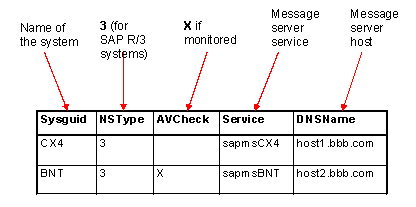
CSMSYS
|
SYSGUID |
SYSID |
|
BNT |
BNT |
In this example, the availability of system BNT is being monitored.
Using the table CSMSYSAS, the system determines which application servers (field SYSINSTNAM) of which systems (SYSGUID) are to be monitored. The entry C in the INST_CHECK field shows that a corresponding server is monitored for availability.