 Business Background (QM-QN-NT/NM)
Business Background (QM-QN-NT/NM)
This section describes the business background for immediately assigning and storing incoming documents, and for storing incoming documents to be entered at a later stage in the QM component.
Quality Management and SAP ArchiveLink
In the QM component, you can use
quality notifications to record, process and monitor different types of problems. These problems may or may not be quality-related and their cause may be internal or external. The SAP ArchiveLink function is a cross-application tool that supports you in your notification processing activities. It provides a quick and efficient way of entering original documents that are related to problems and storing them in external storage systems.The SAP ArchiveLink supports the following storage scenarios for incoming documents in QM:
When can you use the scenario "Storage for subsequent entry?"
When storing documents for subsequent entry, the original paper documents relating to a problem are stored in the R/3 System before the business object (in this case, the quality notification) is created. When the incoming document is stored, the system triggers the SAP Business Workflow, which notifies the authorized person(s) that a quality notification must be created. When this person creates and saves the quality notification, the system automatically assigns the stored original document to the notification. The storage process typically takes place in a central mailroom, where a designated person opens, presorts, prepares, and records (scans) the incoming mail.
Storage for Subsequent Entry
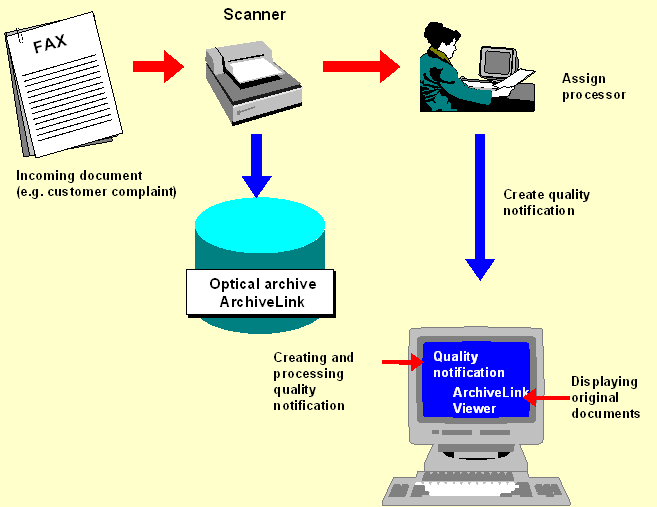
Process Flow: Storage for Subsequent Entry (QM-QN-NT/NM)
When Can You Use the Scenario "Assignment and Storage"?
When assigning and storing documents, the original incoming paper documents relating to a problem are stored in the R/3 System after the business object (in this case the quality notification) has been created. In this situation, the original documents can be assigned to an existing quality notification by the person:
As in the scenario "Storage for subsequent entry", the storage process usually takes place in a central location in the company.
Assignment and Storage

Combining Both Storage Scenarios
In certain situations, you may want to use the scenarios "Storage for subsequent entry" and "Assignment and storage" in combination with each other. For more information, see
Process Flow: Combination of Both Storage Scenarios (QM-QN-NT/NM).