Automatic Posting
Automatic Posting
Use
The Automatic posting function allows you to automatically process flows that occur at regular predefined intervals for previously fixed amounts.

You can use this function for fixed-interest securities to post interest flows or repayments automatically, or flows generated by the conditions.
There are two procedures for processing these regularly recurring flows:
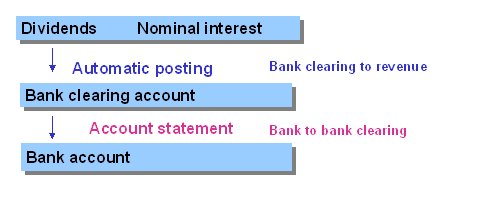
When you use the one-step procedure, the selected flows that have planned status are transferred to actual flows in the subledger by the automatic posting function, and the amounts are posted directly to the bank clearing account in Financial Accounting. The items are cleared in the bank clearing account when the account statement is imported.
If you want to post the flows individually, you can use the
Example: Automatic posting process flow
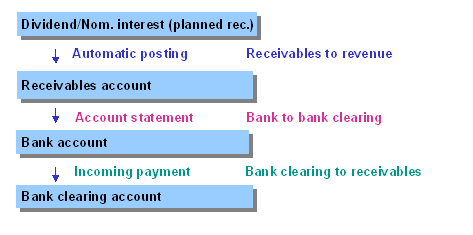
You can also use the automatic posting function together with the Incoming payments function. (To do this, you have to make certain Customizing settings as described in the prerequisites). The automatic posting function not only posts the existing planned records as actual records, but at the same time generates new incoming payment flows as planned records (or actual records) in a receivables account.
When you have imported the ‘account statement’, you can use the
Example: Process flow for automatic posting with incoming payments
Prerequisites
By choosing Define Company Code-Dependent Data, you can define whether automatic posting is actually permitted for each product type.
You also have to create the incoming payment flow types by choosing Define Flow Types and assign them as offsetting flows to the affected flow types by choosing Assign Offsetting Flow for Generating Incoming Payments.
See also:
For more information, see the relevant chapter in the Implementation Guide.
If you defined tax rates for the flow types you want to process using the automatic posting function (by choosing Define Tax Rates in Customizing), these tax flows are generated automatically during automatic posting and are posted as actual records. The automatic posting function also includes taxes that have to be generated for automatically generated taxes.
You also have to set the Posting control field to 01 for the tax flow types by choosing Define Flow Types in Customizing. You enter the relevant data in the Incoming payments field if you want to process incoming payments.
Repayments are the only exception to this rule, because they can be posted by the automatic posting function itself.
The automatic posting run does not include securities accounts containing flows that affect the positions that still have planned status. If this is the case, an error log appears listing the flows that have to be posted first.
See also:
Affected Flows Incoming Payments TaxesFeatures
Selection criteria
General selections | |
Company code |
Selection of securities flows to be processed |
Product type | |
ID number | |
Securities account | |
Upto and including due date | |
Posting control | |
Posting date Document date |
To control how postings to the general ledger in FI are made, you can enter a posting date and a document date. If you do not enter a posting date, the system posts all the flows for an ID number in a company code and a securities account with the earliest due date of the affected flows. The system uses the current date as the document date. |
Test run |
When you select this indicator, the system performs a simulation run. This is the same as the update run, except that no flows are posted to the general ledger or the subledger. |
Output
Posting log
The posting log provides information about all the flows that are transferred to and posted in FI.
Log of actual flows posted and planned records generated
This log displays all the flows that were posted as actual flows as well as the new planned records.
Error logs
This log tells you which position-changing flows still have to be settled in the planned status before they can be posted automatically.
This error log shows you which ID numbers could not be processed for each company code. The reasons for this may be as follows:
This lists all the errors that occur when you post or simulate posting.
Selection parameters output
The selection parameters that were used to start the posting run are listed at the end of the log.
Activities
To go to the automatic posting function, choose Accounting
® Payments ® Automatic posting.