Message Definition in the Application
Message Definition in the Application
Purpose
In the application you determine the values for which a message should be found. You define the message attributes, for example the processing time or the language.
From a technical point of view, you thus create condition records.
When an application calls message determination, condition records are searched for which correspond to the current application data. The search proceeds according to the hierarchy of the defined condition components. When a search is successful, a message with attributes from the corresponding record from table NACH is proposed.
Process flow
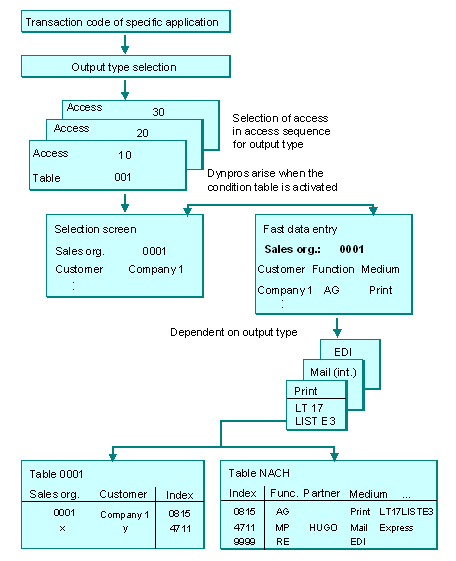
If you create a condition record from the application, the system runs through the condition components as with message determination (see diagram below). The application transfers the relevant application code (for example V1 for "Sales") and the selected output type. Via a screen, you can select your required condition table according to the condition key.

Some transaction screens are dependent on the condition key and provide access to all the Dictionary data which the system associates with the condition key, e.g. documentation or entry help.
After selecting the condition table you create the actual condition record with the message attributes of table NACH. Apart from the language, please note the following important condition record fields:
Transmission mediaProcessing time
Partner determination

Message Control scenario: Condition record
You will also find an example from the SD in the following section:
Diagram: System activities when creating a condition record in the application