 Budget Status
Budget Status
Definition
Indicates the current phase of an
overall budget.Use
You assign a budget status to the overall budget in order to show in the system what phase the execution of the overall budget has reached.
You can assign the following budget status to an overall budget:

Once an overall budget has the status Released, its status cannot be changed back to Proposed.
You can also assign the following statuses in the time between the start of the financial year and the time when the overall budget is approved:
If you change the budget status, this action affects the entire budget hierarchy. In other words, if you change the budget status of a lower-level budget structure element, this change will also affect the top-level budget structure element.

If you create a new overall budget, or carry forward an existing budget, it is automatically given the status Proposed.
Scenario 1:
It is October 1999, and you are planning your overall budget for the year 2000. Therefore, you create a new overall budget for the year 2000, or carry forward the current overall budget to the year 2000. The overall budget for the year 2000 has the status Proposed. This means that you can change the budget hierarchy, assign budgets to budget structure elements, and define budgeting rules, reclassification rules, and earmarkings.
You change the status of the budget to Fixed once you have completed planning of the overall budget and passed this draft overall budget on to the appropriate authority for authorization. You cannot make any changes to an overall budget that has the status Fixed. The authority in question rejects your draft overall budget. Since you need to make changes to your overall budget, you change the status of the budget to Proposed, and make the appropriate changes. Then, when you have resubmitted the new overall budget to the appropriate authority, you change the status to Fixed.
Once the overall budget has been authorized by the authority in question, and the financial year begins, you change the status of the budget to Released. If an overall budget has the status Released, you can use it to finance persons and positions, create earmarkings, define and activate budgeting rules and reclassification rules, carry out budget updates, and make transfer postings.
For example, the overall budget is frozen in November 1999 due to a reduction in funds received. In this case, you would change the budget status to Locked. If the budget status is Locked, you cannot use the overall budget to finance any new persons or positions.
Once the financial year expires, you change the budget status to Completed. You cannot make any changes to an overall budget that has this status.
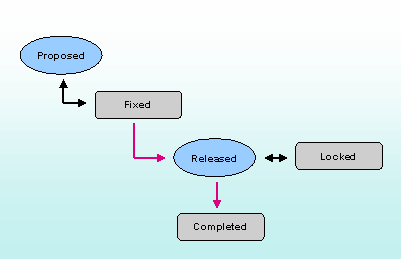
Scenario 2:
You execute your overall budget for 1999, and start planning the overall budget for the year 2000. Therefore, you create a new overall budget for the year 2000, or carry forward the current overall budget to the year 2000. The budget status of the overall budget for the year 2000 is Proposed, and you can work through your planning activities in it.
You change the status of the overall budget for the year 2000 to Fixed once you have completed planning and passed this draft overall budget on to the appropriate authority for authorization. You cannot make any changes to an overall budget that has the status Fixed.
If the new financial year begins before the overall budget is approved, you change the status of the overall budget to Released provisionally. This status is practically the same as the status Released. However, if the status of the overall budget is Released provisionally, you cannot make any transfers, define any reclassification rules or create any new budgets.
Once the overall budget has been authorized by the authority in question, you change the status of the overall budget to Being revised. If the status of the overall budget is Being revised, you can make changes that have arisen due to recommendations by the approving authority. Once you have made the appropriate changes, you change the status of the overall budget to Released so that you can execute it.
If an overall budget has the status Released, you can use it to finance persons and positions, create earmarkings, define and activate budgeting rules and reclassification rules, carry out budget updates, and make transfer postings.
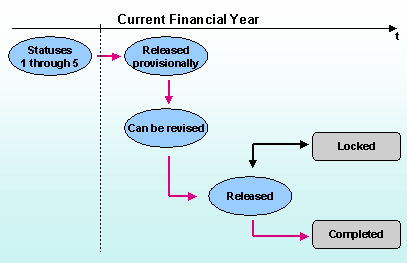
The functions you can use and the information you can display in HR Funds and Position Management are determined by the budget status.
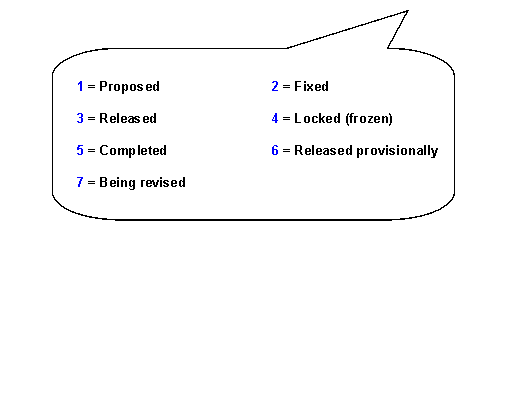
The following table gives you an overview of what functions are available for the various budget statuses.
Functionality |
Budget Status | ||||||
1 |
2 |
3 |
4 |
5 |
6 |
7 | |
| Create Budget Structure Elements |
X |
X |
X | ||||
| Assign Budgets to Budget Structure Elements |
X |
X | |||||
| Allocate Budget for Persons/Positions |
X |
X |
X | ||||
| Create Earmarkings |
X |
X |
X |
X | |||
| Define Budgeting Rules |
X |
X |
X |
X | |||
| Activation of Budgeting Rules |
X |
X |
X | ||||
| Define Reclassification Rules |
X |
X |
X |
X | |||
| Activate Reclassification Rules |
X |
X |
|||||
| Create Transfers |
X |
||||||
| Define Budget Updates |
X |
X |
|||||
| Carry Forward Overall Budget |
X |
X |
X |
X |
X |
X |
X |
See also:
Changing the Budget Status