 Navigation in the CM Workbench
Navigation in the CM Workbench
Use
The CM Workbench is the central navigation and processing tool for Configuration Management. All the functions for creating, changing and displaying configuration folders and Baselines are available to you in one individual screen area.
Features
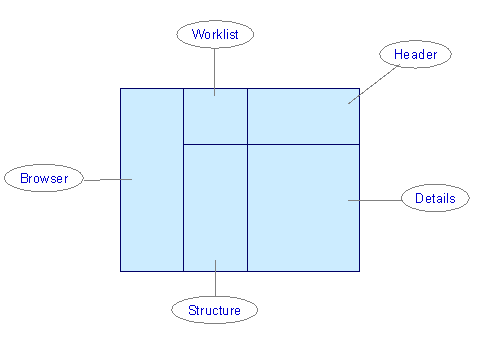
The following screen areas are available to you for working with the CM Workbench:
Worklist
Here, the configuration folders and Baselines that you are working with are displayed. By double clicking on the configuration folder or Baseline, its content is displayed in the screen areas Header, Details and Objects.
Using the button  you can hide or reveal the worklist.
Also see:
WorklistHeader
The header data of a configuration folder or a Baseline are displayed here.
With the buttons in this screen area, you carry out the central activities in Configuration Management.
Button |
Activity |
|
Create configuration definition |
|
Create successor folder |
|
Create Baseline (not CEP) |
|
Publish folder (only CEP) |
Structure
The objects of a configuration folder or a Baseline in an overview tree are displayed here.
Using the button  you can hide or reveal the structure.
Details
Detail and management data for configuration folders or Baselines is displayed here on different tab pages.
Browser
The product structure or project structure are displayed here.
Using the button  you can hide or reveal the browser.
Also see:
Display browser.Activities
To call up the CM Workbench select Logistics ® Central functions ® Configuration Management in the SAP Easy Access menu.
 Config. Def.

