
<Application> (Menu)
The <Application> menu is a pull-down menu at task level. It contains the menu options of the higher-level menu at application level and is to accelerate cross-transaction work processes.
This pull-down menu is optional and is the last menu before the System menu.
Illustration
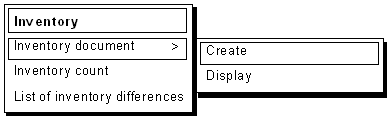
Structure of the Menu <Application> (Example)
Use
The <Application> menu should be included, if possible. It allows the user to alternate between the application functions of the current application. The current application function is exited or cancelled. A confirmation prompt must therefore be issued to avoid a possible data loss (see
Prompts in Dialog Boxes).The menu replaces the explicit exiting of the current application function and the selection of a new application function at application level. The current object class is to be displayed as being inactive because the same functionality is already available in the left menu
<Object>.All object classes of the application and its functions should be included, if possible. If this is not useful because of authorization or job description reasons and/or impossible for space reasons, the most important object classes should be listed as complete as possible.
The <Application> menu should be clearly structured. Otherwise, the user does not have a clear idea of the menu's contents and will no longer use the menu if the search has proved to be in vain.
Cross-References