 System Statuses for Batch Records (PP-PI)
System Statuses for Batch Records (PP-PI)
Use
System statuses document the processing stages of a batch record defined in the standard R/3 system. They are set or deactivated by certain processing steps or business transactions according to a fixed status profile.
At the same time, the status set for a batch record permits certain business transactions and prohibits certain others. This means that system statuses ensure that the sequence of transactions defined in the standard system is followed.
When you create worklists for batch record approval, the R/3 System uses the statuses to select appropriate batch records. You can create worklists for all other system statuses by using a suitable status selection profile.

If required, you can add to the system statuses by defining
Features
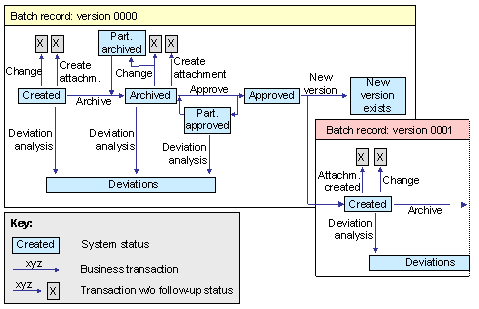
The following graphic provides an overview of the system statuses of the batch record together with the business transactions that set or deactivate them.
Status Profile of the Batch Record
Note the following when you process the individual transactions and statuses:
When the system generates a batch record or a new batch record version, it sets the initial status Batch record created. Each new status that is set for a version deactivates the previous status. The status Batch record contains deviations is the only status that is set in addition to an existing status and is not activated by any other status.
You perform this transaction whenever you access the batch record to change it in any way. This means it comprises the following functions:
Depending on your Customizing settings, you perform this transaction as follows (see Customizing for Batch Records, Define Material-Specific Overall Profile, Archive during approval indicator).
In this case, the system sets the status Batch record archived internally and deactivates it immediately afterwards.
You perform this transaction when you change a batch record that has already been approved (see transaction Change batch record).
The system sets this status when it detects deviations during deviation analysis.
The system assigns this status to a batch record that has not yet been approved when new R/3 objects were created for the batch after the batch record has been archived. It is set when you access the batch record the next time to change it.
If a signature strategy is carried out when a batch record is approved, the system does not set the status Approved for the batch record unless all required individual signatures have been executed. However, it is assigned the status Partially approved once the first individual signature has been executed and can thus no longer be changed (except for performing a deviation analysis).
The transactions Change batch record and Batch record: create attachment do not influence a system status. You can, however, use these transactions to set or deactivate a user status (
Activities
To display this information, choose  next to the status bar when you display or edit a batch record.