 Condition Technique
Use
You use the condition technique to calculate remuneration, valuation and liability for commission cases. The results are transported to the commissions system in the field transport.
The condition technique method is mainly the same as the method used in the standard system.
For more information on the condition technique in the standard system, see:
Introduction to the Condition Technique
How Condition Technique Elements Work Together

There is a new version of the field transport from Release 4.64 that has additional functions.
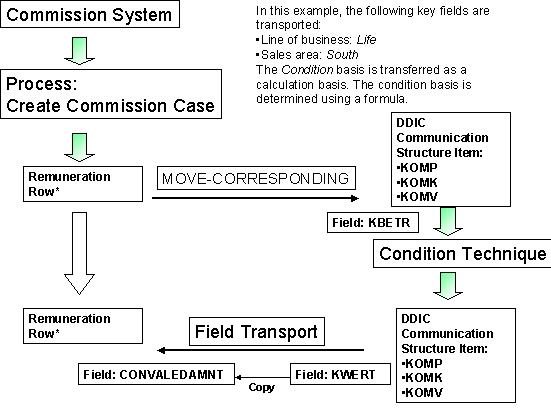
* The process is the same for valuation.
The result of the KWERT field is copied to the remuneration amount (CONVALEDANMT). The process is the same for valuation.
Prerequisites
You have
Edited agreements for valuation, remuneration or liability in Customizing under
Incentive and Commission Management
→
Basic and Master Data
→
Standard Commission Contract
→
Valuation Agreement
or
Liability Agreement
or
Remuneration Agreement.
Maintained each agreement in the commission contract.
Assigned a logical service to the remuneration type.
Assigned a calculation procedure and a calculation type to the remuneration type.
Created a condition type in Customizing under
Incentive and Commission Management
→
Basic and Master Data
→
Standard Commission Contract
→
Valuation Agreement
or
Liability Agreement
or
Remuneration Agreement.
Assigned an access sequence to the condition type in Customizing under
Commissions.
The field catalog is a field selection for the key fields in the condition tables for
remuneration. You process this in Customizing under
Incentive and Commission Management
→
Basic and Master Data
→
Standard Commission Contract
→
Valuation Agreement
or
Liability Agreement
or
Remuneration Agreement
→
Agreements for Performance-Related Remuneration
→
Condition Tables
→
Field Transports
→
Maintain Condition Technique.
In the data dictionary, you need to use your append structure to assign the fields that are not in the field catalog to the CACS_S_CUST_COND structure.
Features
Transport of Standard Conditions
The Customizing data is transferred from a consolidation system into the productive system using a batch input. This is done in Customizing in three steps under
Tools
→
Transport System.
Choose the following steps:
Conditions: Create Sequential File
Conditions: Create Batch Input Session
Conditions: Run Batch Input Session
You use the commission contract to maintain the master data.
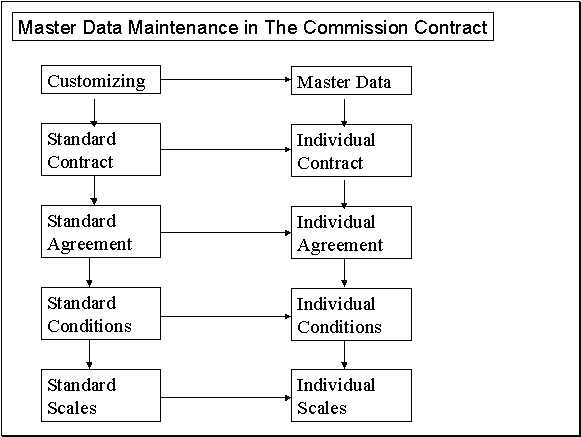
(See also: Processing Agreements for Performance-Related Remuneration )
To maintain the standard condition records, go to Customizing and choose
Incentive and Commission Management
→
Basic and Master Data
→
Standard Commission Contract
→
Valuation Agreement
→
Maintain Contents of Condition Table.
(See also:
Processing Standard Scales
)
The following example shows the processes that a sales manager has in the condition technique:

Conditions in the Commission Contract
When a commission contract is created, the contract is assigned condition recordssapurl_link_0005_00011_0010from the standard contract.
You can define the condition records for the standard contract in Customizing:
Incentive and Commission Management
→
Basic and Master Data
Standard Commission Contract
→
Remuneration Agreements
→
Agreement for Activity-Dependent Remuneration
→S
tandard Agreement for Performance-Related Remuneration.
Each standard contract can contain different standard individual conditions. If a commission contract partner has different conditions from the standard, these can be changed individually by choosing
Commission Contract
→
Change
on the tab page
Performance-Related Remuneration
.
Individual Conditions
In the commission contract, individual conditions are displayed on the tab page
Performance-related remuneration
using an overview tree.
You can assign condition records for different condition types by using the access sequence.
The condition records to be assigned can depend on different characteristics. Characteristics are assigned using calculation procedure Customizing.
You can change the field sequence in which the characteristics are to be sorted by going to
Customizing and choosing
Incentive and Commission Management
→
Basic and Master Data
→
Commission Contract
→
Contract Elements
→
Change Sort Order of Remuneration Criteria.
You can
set up the field sequence using the
commission contract under the
Performance-Related Remuneration
tab page on the
Individual Agreements
screen by choosing the button
Specify Field Sequence.
If you double click on a row in the overview tree, a dialog box is displayed on the screen. In this window you will see the selection criteria, the standard commission rates and their validity periods. You can now replace the standard commission rates with individual ones.
Standard Individual Conditions
Standard individual conditions are displayed on the
Standard Agreement for Performance-Related Remuneration
view. The values shown are for information purposes only, and cannot be changed.
Activities
Creating and Editing Condition Types
SAP delivers remuneration types 8000 and 9000 in the Standard System. When you create a condition type, you can enter the following:
Control Data
Condition class B
Calculation type
Scales
Scale base type
Check
Scale type
Creating and Editing Condition Tables
Condition Table for Remuneration*
The following fields require entries when you create a condition table for remuneration:
Short Description |
Key |
Row Field |
Field Name |
Commission application |
X |
|
P_CACSAPPL |
Agreement number |
X |
X |
P_CTRT_XL |
Customer field** |
X |
X |
Customer field* |
Version date
|
X |
X |
P_VERSION |
Status |
|
|
P_STATE |
Customer data field** |
|
|
Customer data field** |
*The condition table for valuation is the same as the one for remuneration
without the
agreement number
row.
Valuation is a global agreement, not a standard one.
**You can insert your own fields here, to include your own particular requirements.
In the remuneration table or valuation table, do
not select the
Release Status
indicator.
Example
A contract partner from the sales area
South
sells a life insurance with an insurance sum of 100 000 USD.
To calculate the remuneration, the system uses the following key fields:
LoB (Life)
Sales area (South)
and uses the condition basis ( KAWRT) of 100 000 USD as a calculation basis.
Process Flow
Process Step: Participant DeterminationYou determine the standard agreements in this step.
Process Step: RemunerationRemuneration Calculation You determine the remuneration type.
Process Step: Calculate RemunerationIn this step, you determine the price for SD.
a. Determination of condition schema 8000.
b. Determination of condition type 8000.
c. Determination of condition table 196.
i. Standard Scale: Determination of key fields (line of business: Life, Sales area: South) and the standard agreement: 15% ( KBETR).
ii. Individual Scale: Determination of key fields (line of business: Life, Sales area: South) and the standard agreement: 45%.
d. The document is transferred. The contract partner receives 45% of the 100 000 USD, thus 4500 USD (KWERT).