Banking Application Process
Learn about the banking application process used in Financial Services Accelerator.
General Overview
- Configure a Product
- Add Options
- Personal Details
- Review Information
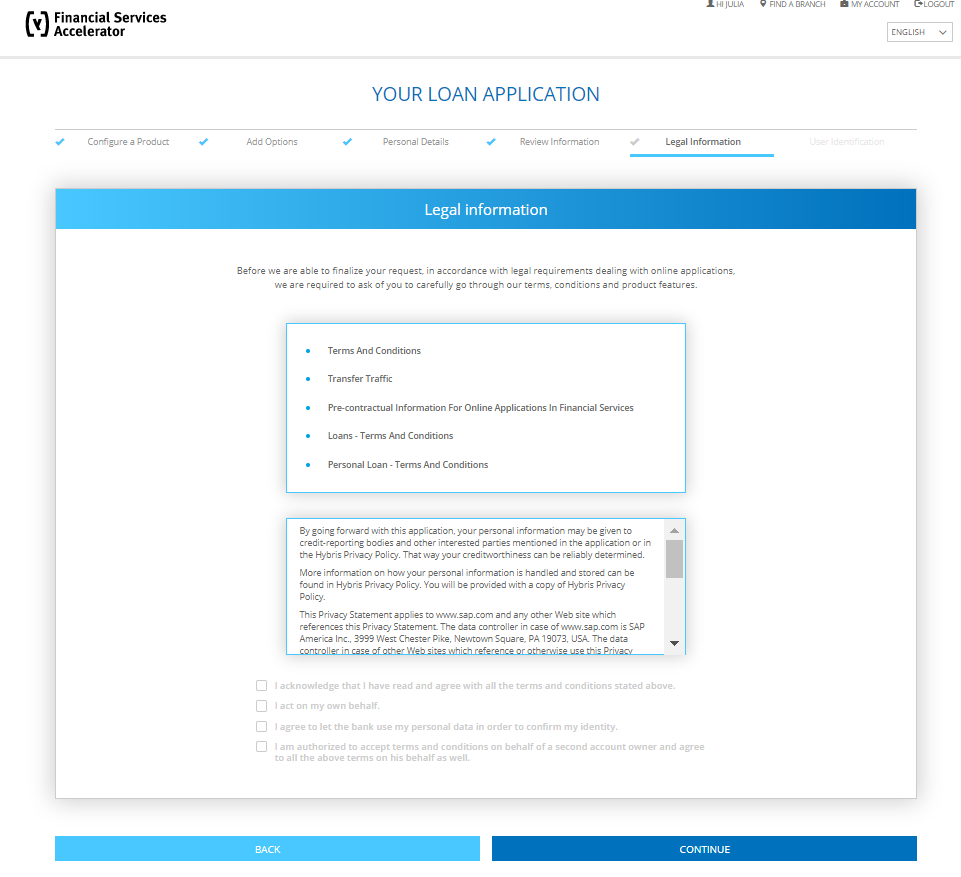
- Legal Information
- Usage of configurable products approach for customizing the product during application process
- Absence of Payment Details page
- Inclusion of Legal Information page
The User Identification step is also a custom page, but since it is a part of the ordering process, it is discussed in Banking Ordering Process document. This page is intended as a starting point for various ways on how a company can integrate a video identification service (currently not supported in default implementation).
All the application steps are customizable in the implementation project.
Configure a Product and Add Options Page
Sample banking products are implemented as configurable products, in order to facilitate easier utilization and handling of custom values provided by the customer. The mini cart is now displayed on the first page of the application process and is dynamically updated.
As on the insurance storefront, the assumption is that customer buys min/max one main product and adds zero or more optional products. Furthermore, optional products can also be mutually exclusive, allowing for more fine-grained product data model definitions. Service fee, however, is treated as a mandatory optional product.

For more information, see Configurable Products and Dynamic Pricing.
Personal Details Page
The Personal Details page is reused from B2C Accelerator. It contains a yForm that is implemented through JSP content injection, and which is used for acquiring personal details from the customer, relevant for contract conclusion. For more information, see Banking Ordering Process.
Review Information Page
The Review Information page is also reused from B2C Accelerator. It follows the similar structure as the Quote Review page of the insurance storefront.
Legal Information Page
The Legal Information page is a custom page. The legal documents area is introduced so that the customers are able to familiarize themselves with relevant terms & conditions associated with products they added to the cart, as well as with all super categories which are (in)directly related to the product. This way the company representative can easily maintain the documents in Backoffice, while the results would be visible to the customers when they start purchasing of products. In order to proceed to the next step (User Identification), the users need to confirm all the check boxes that state the bank's requests.