Insurance Quotation and Ordering Process
Learn about the insurance quotation and ordering process used in Financial Services Accelerator.
General Overview
- Choose a Cover
- What's Included
- Add Options
- Personal Details
- Quote Review
- Payment Details
- Final Review
These steps are explained in detail in the next section of this document.
User-Data Collection
- Pricing
- Controlling the quotation content
- Displaying and reviewing the provided information
- Generating PDF with order-specific values
For more information, see yForms.
Trip Details Form
Persisting Information from the Trip Details Form to the Cart Entry
The customer provides the information to the Trip Details form. Clicking the Find Prices button stores the Trip Details information into the session. Clicking the Add to Cart button persists the information stored in the session to the InsuranceQuoteModel as a key-value pair in a java.util.Map.
Persisting information from the Trip Details form to the Cart Entry is possible with the following implementations:
- Introducing the new InsuranceCartFacade that extends from the BundleCartFacade.
- Adding the InsuranceAddToCart strategy interface that distinguishes the add-to-cart action by the default category of a product.
- Mapping the InsuranceQuoteModel that holds the travel information into the cart. You can find the persisted information in the
 Marketing
 Cart Administration Tab insuranceQuote
 .
The InsuranceQuoteModel persists the following travel information as a key-value pair in a Map <String, Object> for convenient retrieving in further processing:
- the trip destination
- trip start and end date
- the number of travelers
- the ages of travelers
Legend
- Orange: Financial-Specific Functionality
- Blue: SAP Functionality
Model UML

Class UML

Reading the Data from the Cart Object to Form Item
The customer provides the information on the Trip Details form. Clicking the Find Prices button stores the Trip Details information into the session. The Traveler Information form dynamically shows the correct, details for a traveler per the details captured on the Trip Details form. For example, the number of travelers and the age of travelers are populated to the Traveler Information form.


Reading the data from the cart object to the form item is possible with the following implementations:
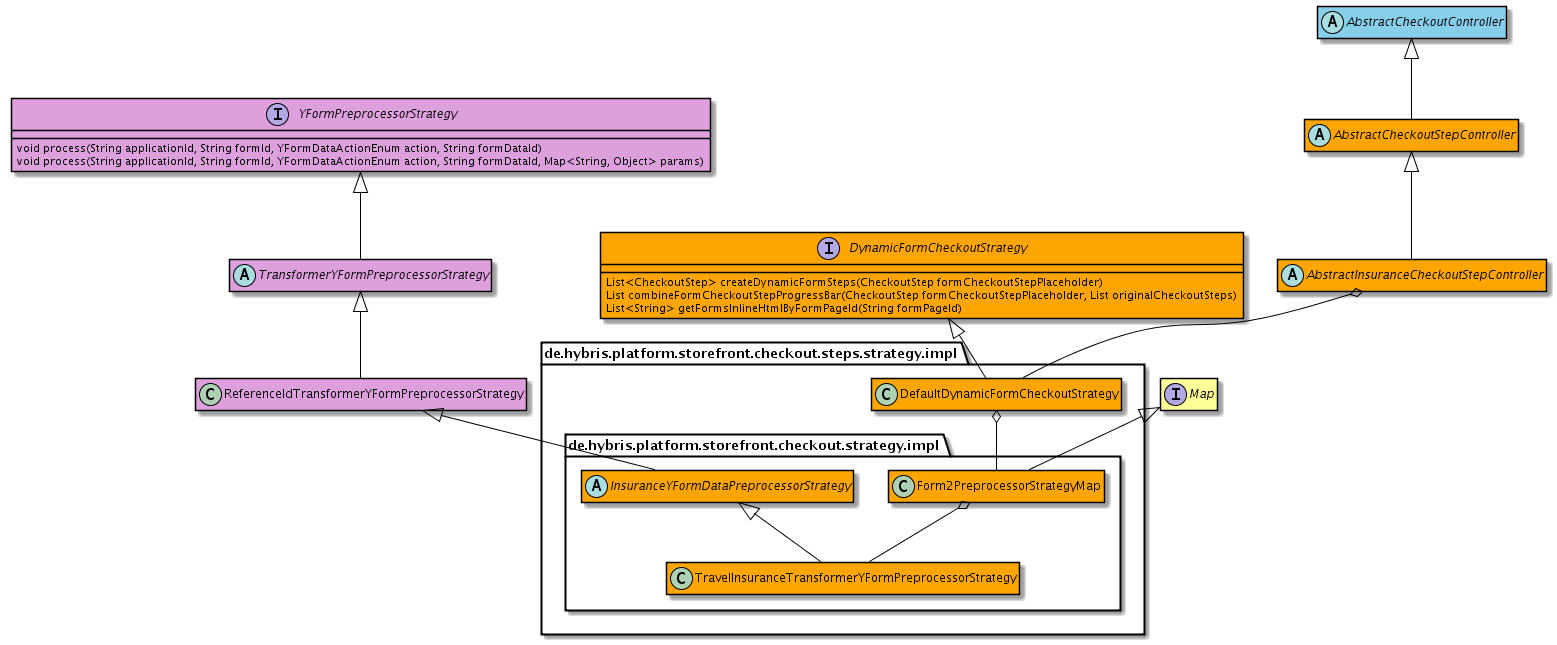
- Creating the InsuranceYFormDataPreprocessorStrategy that extends the ReferenceIdTransformerYFormPreprocessorStrategy in the xyform-module. Naming all the yformData by default insuranceReferenceIdTransformerYFormPreprocessorStrategy.
- Extending from InsuranceYFormDataPreprocessorStrategy class for specific yformData preprocess strategy.
For example, for travel insurance, TravelInsuranceTransformerYFormPreprocessorStrategy is created and this class implements the transform() method to prepopulate the number of travelers and ages into the yformData.
- Providing parameters to the TravelInsuranceTransformerYFormPreprocessorStrategy.transform() method. The parameters must contain InsuranceYFormDataPreprocessorStrategy.FORM_DETAIL_DATA, that is in fact FormDetailsData. In the FormDetailsData object, set the orderEntryNumber value in the order so that you can obtain the persisted InsuranceQuoteModel from the related cart entry.
- Adding the map of InsuranceYFormDataPreprocessorStrategy to the Spring bean form2PreprocessorStrategyMap. The key for the strategy is the YFormDefinition.formId. For example, TravelForm-TravellerInformation, TravelForm-TripDetails.
Legend
- Yellow: Java API Functionality
- Orange: Financial-Specific Functionality
- Purple: yForms Functionality
- Blue: SAP Functionality
Retrieving and Rendering Trip Information from InsuranceQuote
The customer provides trip details and selects the product and its options from the cart, which are then displayed in the cart summary.

Retrieving and rendering the trip information from InsuranceQuote is possible with the following implementations:
- Adding InsuranceQuoteData in financialfacades-beans.xml to store values for the Quote Review page.
- Adding InsuranceOrderQuotePopulator that populates the InsuranceQuoteModel to InsuranceQuoteData.
- Adding cartSummaryInsuranceInfo.tag to display the InsuranceQuoteData value.
Legend
- Orange: Financial-Specific Functionality
- Purple: yForms Functionality
- Blue: SAP Functionality
UML DTO

UML Populator

Quote Review Page
Populating Your Details
On the Quote Review page, the customer can preview the main traveler and the details of additional travelers. The Policy Holder information contains the name, age, address, and telephone number of a policy holder. The information about additional travelers contains their first and last names, and age.
Population of the Your Details is implemented in the following way:
- InsuranceQuoteReviewDetailsPopulator populates the InsuranceQuoteReviewData, which is used by the JSP to render the Your Details information.
- In the InsuranceQuoteReviewDetailsPopulator, there is a map of InsuranceDetailPopulators. Its key is the defaultCategoryCode and the value is a list of insurance details the populator implements. In the travel insurance case, the populators are TravelInsurancePolicyHolderDetailsPopulator and TravelInsuranceTravelerDetailsPopulator.


Legend
- Orange: Financial-Specific Functionality
- Blue: SAP Functionality
DTO UML

Class UML

Quote Header
The customer can review the insurance-specific plan, generate a quote number, and expiry date on the Quote Review page.

Legend
- Orange: Financial-Specific Functionality
- Blue: SAP Functionality
Class UML

What's Included
On the Quote Review page, the customer can see the associated coverages that are included in the plan being purchased.
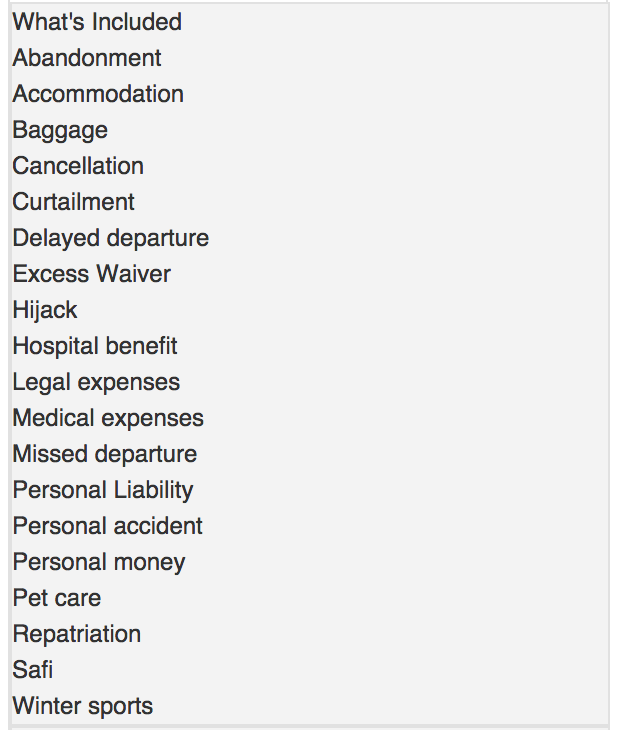
The items in What's Included section are implemented in the following way:
- The included items are assembled from the populated data in the DefaultInsuranceQuoteReviewFacade
- The included items are rendered on the page from InsuranceCoverageData.coverageProduct.name, which is populated from the ProductData.price.oneTimeChargeEntries.billingTime.name.
Optional Extras
In the Quote Review page, the customer can see the chosen Optional Extras.

The Optional Extras are implemented in the following way:
- The Optional Extras product benefits are populated by InsuranceQuoteReviewDetailsPopulator.
- The Optional Extras section is rendered by InsuranceCoverageData.coverageProduct.name.
Legend
- Orange: Financial-Specific Functionality
- Blue: SAP Functionality
DTOs UML

Class UML

Populators UML

Order Confirmation Page
Policy Number Component
The Policy Number component on the Order Confirmation page is implemented in the following way:
- The policy number, start date, and end date are populated by the InsuranceOrderPolicyPopulator.
- The JSP renders the policyNumber, policyStartDate, and policyEndDate from the InsurancePolicyData.
Legend
- Orange: Financial-Specific Functionality
- Blue: SAP Functionality
DTO UML

Populator UML

Policy Summary on Order Confirmation Page
The customer can review the What's Included and Optional Extras sections on the Order Confirmation page.

Policy summary is implemented in the following way:
- The main coverage benefits, that is, Optional Extras benefits are populated by the InsuranceOrderPolicyPopulator.
- The main coverage benefits source is populated by the productData.price.oneTimeChargeEntry.billingTime.name.
- The What's Included section is rendered by the InsuranceBenefitData.name.
- The Optional Extras section is rendered by the InsuranceCoverageData.coverageProduct.name.
Legend
- Orange: Financial-Specific Functionality
- Blue: SAP Functionality
Populator UML

Order Splitting
Insurers and banks can have different use cases to split the order into meaningful order entry groups, so it can perform separate fulfillment to the back end or external systems.
FsOrderSplittingService extends the functionality of OrderSplittingService with new strategies that split an order into sets of order entries. For each set of order entries split by the FulfilmentType, a consignment is created.
- FINANCIAL_MOCK, used for products that are not integrated with external SAP systems.
- FINANCIAL_3RD_PARTY, used fr products that are intended to be delivered to the customer. For example, Winter Tires are implemented as a third-party product and are delivered with an Auto policy. In that case, we will have two consignments created, for the standard product and the third-party product. Also, products are grouped into two Order Entry Groups.
- FINANCIAL_S4I, used as the opposite of the mock type, when the product is integrated and the connection is established with SAP for Insurance.
The following Spring configuration has been added to the Financial Services Accelerator to support order splitting:
<alias name="defaultFSSplitByPoS" alias="fsSplitByPoS"/>
<bean id="defaultFSSplitByPoS" class="de.hybris.platform.financialprocess.strategy.impl.FSSplitByPoS" />

<alias name="defaultFSSplitByFulfilmentType" alias="fsSplitByFulfilmentType"/>
<bean id="defaultFSSplitByFulfilmentType" class="de.hybris.platform.financialprocess.strategy.impl.FSSplitByFulfilmentType" />

<alias name="defaultFSSplitByEntryDeliveryAddress" alias="fsSplitByEntryDeliveryAddress"/>
<bean id="defaultFSSplitByEntryDeliveryAddress" class="de.hybris.platform.financialprocess.strategy.impl.FSSplitByEntryDeliveryAddress"/>

<!-- Order Splitting -->
<alias name="fsAcceleratorfulfilmentprocessOrderSplittingService" alias="fsOrderSplittingService"/>
<bean id="fsAcceleratorfulfilmentprocessOrderSplittingService" parent="defaultOrderSplittingService" >
<property name="strategiesList">
<list>
<ref bean="fsSplitByFulfilmentType"/>
<ref bean="splitByAvailableCount"/>
<ref bean="splitByDeliveryMode" />
<ref bean="fsSplitByPoS" />
<ref bean="splitByNamedDeliveryDate" />
<ref bean="fsSplitByEntryDeliveryAddress" />
<ref bean="splitByWarehouse" />
</list>
</property>
</bean>
All the customization of financial-order-process and consignment-process is done within the financialprocess extension. For more information, see financialprocess Extension.
For more information on the order splitting process, see Order Splitting Implementation, Grouping Cart Entries and yacceleratorfulfilmentprocess Extension.
Download Policy Link
On the Order Confirmation page, the Download Policy button allows the customer to read or download the policy.
The Download Policy link is implemented in the following way:
- The information including the order and product details is captured by the data entered by the user. When the order is placed, and it accesses the service by orderCode, the system populates the necessary information to the InsurancePolicyData, which is then used to populate the PDF template slots.
- Rearrangement of the PDF display and the dynamic information:
- Benefit name is obtained from the billingTime data name.
- Benefit description is retrieved from the billingTime data description.
- Benefit coverage is taken from orderEntry price, where the entry is not Paynow.
- Category name and code are taken from the default category name and code of the main product.
- Policy one time price is retrieved from the orderTotal.
- The PDF generation takes place inside the façade with the implementation of the refined PDF controller. This solution minimizes the effort to move the code to other controllers during the document generation process. The new function is added to the InsuranceAccountPageController, which is used on the Order Confirmation page. In this case, the request is done via a secure environment with desired OrderCode. The controller can't be reused. The setup with a secure controller requires access to the Spring security configuration, but the AddOns have no capability to override that configuration. As a result, they use the existing controllers.
- To ensure that an unauthorized person doesn't pick up the policy from someone else, the OrderCode is used to retrieve the corresponding order. If the order doesn't exist, then the InsuranceAccountPageController captures that the model found an exception and it redirects to 404 Not Found page.
