 Transfer of Time Sheet Data to the Target Components
Purpose
You use the time sheetto record data that can be relevant for several SAP components. Some employees, for example, record data confirming a
Project System
network. Others use the time sheet to enter time data for
Personnel Time Management.
In some cases, employees record data that is relevant for several target components at once.
You can transfer data to the target components as follows:
Using transfer reports
In
Materials Management:
using a transactionIn
cProjects:
using an ALE connection by means of IDocs
The graphic below illustrates the technical processes involved in transferring data to the target components.
Process Flow
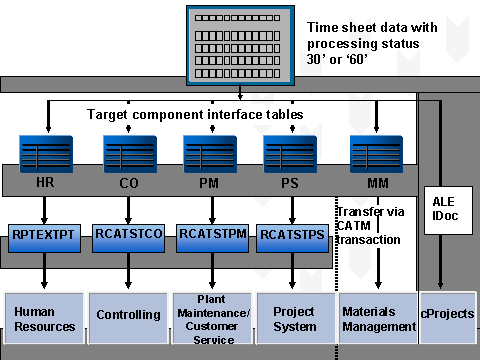
The system saves time sheet data to the CATSDB database table for the time sheet.
The system writes time sheet data assigned the processing status "30" (
Approved
) and "60" (Canceled
) as follows:To the interface tables:
PTEX2000 and PTEX2010 in
Human Resources
CATSCO in
Controlling
CATSPM in
Plant Maintenance/Customer Service
CATSPS in
Project System
CATSMM in
Materials Management
By ALE connection
Interface table in the
cProjects
systemThe system determines which components are to be supplied in which way based on the data record's working time attributes.
When you run the data transfer reports, the time sheet data is transferred to the target components
Human Resources
(HR),Controlling
(CO),Plant Maintenance/Customer Service
(PM/CS), andProject System
(PS).You can use the following data transfer reports for individual components:
RPTEXTPT for Human Resources
RCATSTCO for Controlling
RCATSTPM for Plant Maintenance/Customer Service
RCATSTPS for Project System
To enable you to transfer data to HR, CO, PM/CS, and PS in one step, an additional report for multiple components is available.
Note that you transfer data to
Materials Management
using transaction CATM.
Result
You have transferred time sheet data to the target components.
 Note
Note
For more information on the tables affected by this process, see Technical Background to the Time Sheet .