 Setting Up of Maintenance Task Lists
Purpose
You need maintenance task lists (MTL) to use the maintenance and service planning board.
MTL contain both slot task lists to reserve a service area and check task lists to plan the activities necessary to maintain a maintenance object.
Prerequisites
The required Customizing activities have been defined. For more information, see Preparatory Activities in SAP SCM .
Your user is assigned to iPPE user profile
S_MSPALL
:
For all users, in the
mySAP SCM – Implementation Guide
, under
Advanced Planning and Optimization

Master Data
Integrated Product and Process Engineering (iPPE)
Settings for iPPE Workbench Professional
Define iPPE User Profiles

For individual users, on the
SAP Easy Access
screen, under Advanced Planning and Optimization
Master Data
Integrated product and Process Engineering (iPPE)
User Assignment: iPPE Workbench Professional
Process Flow
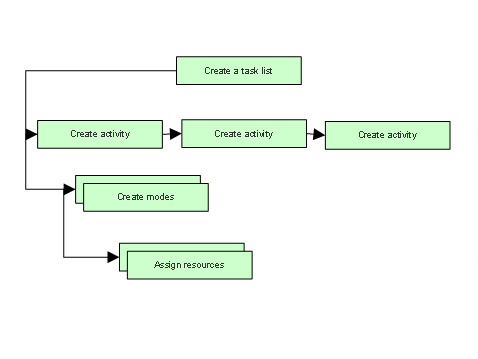
Setting Up of Slot Task Lists
You create a slot task list header.
On the
Activities
tab, you create one service area activity and one or more slot activities for the slot task list header. If required, you can change the sequence of the activities.You double-click on the activity to create the mode, which describes how the activity should be executed. You can create one or more modes, which are then alternative ways of executing the activity.
When creating the mode, you assign a primary resource to it. If the resource already exists, you also enter a location.
Setting Up of Check Task Lists
You create a check task list header.
On the
Activities
tab, you create one or more check activities for the check task list header. If required, you can change the sequence of the activities.You double-click on the activity to create the mode, which describes how the activity should be executed. You can create one or more modes, which are then alternative ways of executing the activity.
When creating the mode, you assign a primary resource to it. If the resource already exists, you also enter a location.
If required, you can also assign a secondary resource, such as tools, to the primary resource.
See also:
Defining an Activity in a Task List
Changing Slot Activity Relationships
Creating Modes and Assigning Resources in a Task List Activity