 Dispute Management for Self-Billing
The figure below illustrates how dispute management fits in a self-billing process and is followed by an explanation:
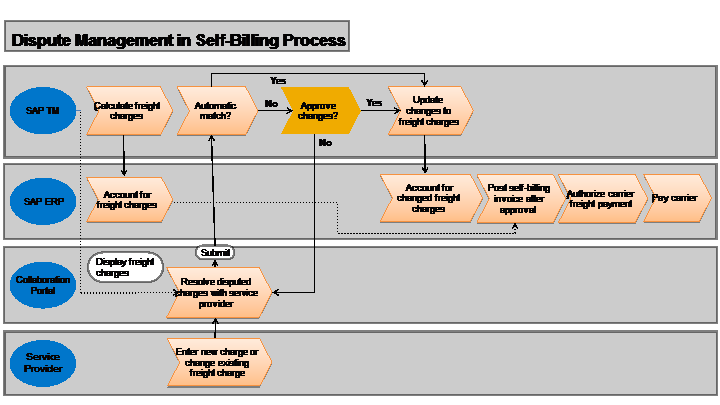
Your service provider can use the self-billing features on the SAP TM collaboration portal to create a dispute case against a charge amount and a logistics quantity in the freight order. On the NWBC dispute case screens, you can approve, reject, or propose a change to the dispute case. The system displays your decision on the collaboration portal, where the service provider can accept your proposal or re-submit the dispute case.
More Information
Subject | More Information |
|---|---|
Structure of an individual dispute case on NWBC, including working with a dispute case | |
Necessary Customizing settings required before you can use dispute management | |
Individual aspects of dispute management | |
Details of how SAP TM updates SAP ERP | |
Self-billing in SAP ERP | SAP Help Portal at http://help.sap.com/erp |
SAP TM collaboration portal |


