 Sample Process: Rescheduling
During rescheduling, the system redistributes the available quantity according to the selection in the entry screen (transaction V_V2). For each sales order that is relevant for SAP TM, the system calls the SAP TM scheduling service within an ATP check.
 Note
Note
Scheduling of SAP ERP stock transport orders is not supported in SAP TM.
Prerequisites
The same prerequisites apply as specified in Scheduling of SAP ERP Sales Orders in SAP TM.
Process
The following figure shows a sample process for rescheduling:
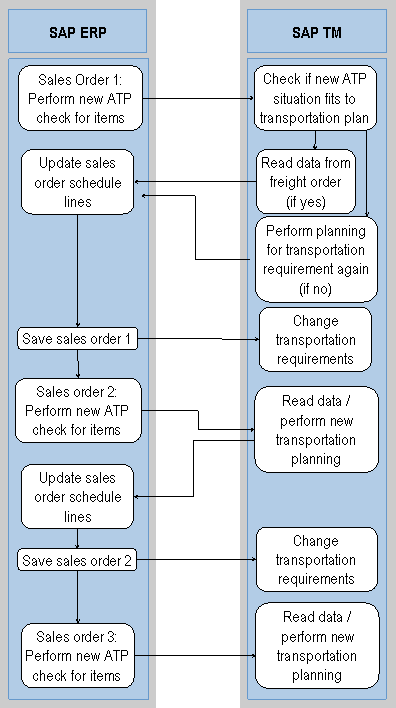
Sales order 1: Perform new ATP check for items (SAP ERP)
If sales order 1 is relevant for SAP TM, the system calls the SAP TM scheduling service for all sales order items. To ensure a meaningful scheduling, pay special attention to the selection of sales order items and the sequence in which they are processed. Sales order items of a sales order that are processed one after the other in the rescheduling run are sent together in one call to SAP TM to do the rescheduling there. This ensures that transportation interdependencies can be considered in scheduling in SAP TM.
Check if new ATP situation complies with transportation plan (SAP TM)
Read data from freight order or freight booking (if YES) (SAP TM)
For more information, see steps four to six of the process for changing a sales order (see Sample Process: Changing a Sales Order).
Perform new planning for transportation requirement (if NO) (SAP TM)
If necessary, the system performs a new planning. For example, when the system has created new freight units, these are planned in the same way as described in the sample process for creating a sales order (see Sample Process: Creating a Sales Order).
NoteSAP TM Planning in sales order scheduling takes into account only those sales order items that are currently being planned. It does not process other objects in the optimization run, for example transportation requirements, that are linked to other sales orders.
End of the note.Update sales order schedule lines (SAP ERP)
The system updates the schedule lines in the sales order according to the planning results.
Save sales order 1 (SAP ERP)
The system saves the sales order in SAP ERP and transfers it asynchronously to SAP TM.
Change transportation requirements (SAP TM)
The system changes the transportation requirements.
The system repeats these steps for sales order 2, sales order 3, and so on.