
 Procurement Using an APO Scheduling
Agreement
Procurement Using an APO Scheduling
Agreement

Purpose
In procurement using APO scheduling agreements, delivery schedule lines and scheduling agreement (SA) releases (specific types of delivery schedule) are generated in the APO system.
In this process, you first create an external procurement order with reference to an APO scheduling agreement in the SAP APO system. The external procurement order corresponds to a delivery schedule line for this scheduling agreement item. Scheduling agreement (SA) releases are then created in the APO system. The data of the SA release is transferred to the OLTP system and there converted into SA delivery schedule lines, so that inbound deliveries, goods receipts, and incoming invoices can be posted in your OLTP system. As soon as inbound deliveries and goods receipts for the SA releases are posted in the OLTP system, the relevant data is transmitted to the APO system.
Invoices received for SA items are posted in the OLTP system. You can view these in the purchase order (PO) history that is imported from the ERP system by remote function call (RFC).

In the APO
system, you can find information on inbound deliveries, goods receipts, and
invoices in the relevant external procurement relationship by choosing  Display Last Deliveries and
  Display PO History.
Integration
Within Collaborative Management of Delivery Schedules vendors can confirm scheduling agreement releases that they receive in your APO system.
You can receive and process these confirmations in your APO system.
For more information, see Collaborative Management of Procurement and Sales Scheduling Agreements and Confirmations.
You can also implement a Process Without Releases with Confirmation in SNP.
For more
information, see
 Procurement Scheduling
Agreements in Heuristic-Based SNP.
Procurement Scheduling
Agreements in Heuristic-Based SNP.
If you want to work with Internet releases you must use the Supplier Workplace (SWP), which your vendors can access over the Internet. For more information see SAP Note 451976 (2002).
Your vendors can display and confirm scheduling agreement releases over the Internet. In addition, they can access certain information on the scheduling agreement, delivery schedule lines, goods receipts, agreed prices and so on, in the customer system.

If you wish to
work with Internet releases, you must specify this for each scheduling
agreement item. To do this go to the external procurement relationship and on
the  Scheduling Agreement
tab page select the
Internet
Releases indicator.
Scheduling Agreement
tab page select the
Internet
Releases indicator.
(See External Procurement Relationship)
For Internet releases, no actions for release output are generated when the release is created, because the release is not output, but made available to the vendor in the Supplier Workplace.
If your vendor wishes to view and acknowledge his Internet releases in the Supplier Workplace (SWP), then not only are the Internet releases from the ERP system selected and displayed, but also those from the APO system. These are transferred from the APO system to the ERP system by RFC.
For more
information see the SAP Library for Materials Management (MM) under
Purchasing (MM-PUR) under  Internet Release and for SAP for Discrete Industries under SAP
for Automotive under Supplier Workplace.
Internet Release and for SAP for Discrete Industries under SAP
for Automotive under Supplier Workplace.
Prerequisites
In order for a scheduling agreement item to be planned as an APO scheduling agreement in the APO system, the following conditions must be fulfilled in the ERP system:
· In the additional data for the scheduling agreement item, choose the setting Generate and output SA release in APO for the External Planning indicator.
As a rule, the APO scheduling agreement in the ERP system is a scheduling agreement with the document type LP.
If you use scheduling agreements of the document type LPA without confirmation control key then no default quantities can be determined from the release upon goods receipt.
If you use scheduling agreements of the document type LPA with confirmation control key then the default quantities from the confirmation (shipping notification) are used.
If delivery schedule lines already exist for an SA item, the setting for the External Planning indicator can no longer be changed.
The setting of
the External Planning indicator for the APO
scheduling agreement in the ERP system can be seen in the Sch. Agmt.
Cont. field on the Scheduling
Agreement tab page in the external procurement relationship.
· Transfer the SA item to the APO system over the APO Core Interface (CIF).
For more information on the prerequisites, see Prerequisites for the APO Scheduling Agreement.
Process
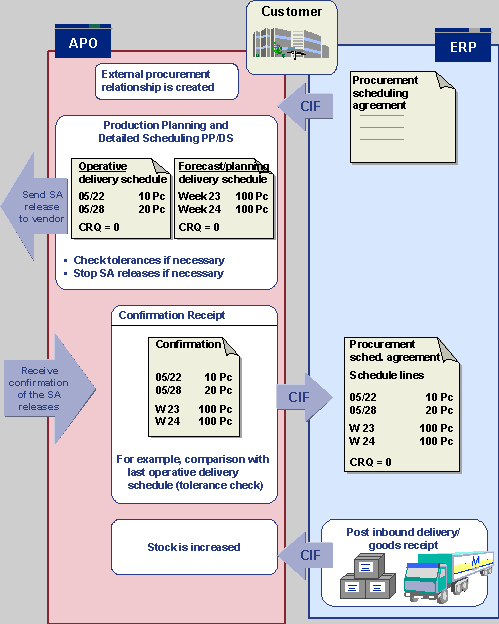
The process of procurement using an APO scheduling agreement with confirmation of the SA releases by the vendor is as follows:
...
...
1. In automatic or interactive planning, a source of supply of the procurement category APO scheduling agreement is determined to cover a product requirement. An external procurement order with reference to an APO scheduling agreement is created. This corresponds to a delivery schedule line for the relevant SA item.
2. Scheduling agreement releases (operative delivery schedules or forecast/delivery schedules) are then generated and output in the APO system for these schedule lines.
For more information, see Creating Scheduling Agreement Releases and Outputting Scheduling Agreement Releases.
3. The quantities and delivery dates of the operative delivery schedules are transferred to the OLTP system and converted into schedule lines for the SA item. This data is required so that confirmations, inbound deliveries and goods movements can be posted in the OLTP system.
4. You post confirmations or inbound deliveries received from your vendor relating to an SA release in your OLTP system. The data is then automatically transferred to the APO system. The notified quantity reduces or cancels out the schedule lines and SA releases.
5. When the product is delivered, you post the goods receipt in your OLTP system. The data is automatically transferred to the APO system. There, the stock figure increases and the schedule lines and SA releases are reduced or canceled out accordingly.
For more information, see the SAP Library under Purchasing (MM-PUR) ® Vendor Outline Agreements (MM-PUR-OA) ® Scheduling Agreement.
6. Invoices received are posted in the OLTP system. If the OLTP system is an ERP system, you can also use the Evaluated Receipt Settlement (ERS) function.
For more information, see Inbound Delivery, Goods Receipt and Invoice/Credit Memo.
Activities
Master Data
Master Data ® Application-Specific Master Data ® Procurement ® Procurement Relationships
Master Data ® Application-Specific Master Data ® Procurement ® Delete Procurement Relationships
Planning and Alerts
Production Planning ® Interactive Production Planning ® Product View
Supply Chain Monitoring ® Alert Monitor
Releases and Confirmations
Supply Chain Collaboration ® Collaborative Procurement ® Scheduling Agreement Releases ® Create Releases, Process Releases, Issue Releases (and Enter Confirmations for the process of Collaborative Management of Delivery Schedules)
Mass Changes
Master Data ® Mass Maintenance
See Mass Maintenance of External Procurement Relationships