
 External Procurement Relationship

Definition
External procurement relationships belong to the master data in the SCM system. They represent purchasing info records, contracts, and scheduling agreements from your OLTP system (for example, an ERP system) in your SCM system and provide all the necessary data for the planning of product procurement.
Use
The external procurement relationship enables you to generate delivery schedule lines for an item of a scheduling agreement (APO scheduling agreement) directly in the SCM system.
The external procurement relationship links the transportation lane with information from your OLTP system:
The
transportation lane represents the business relationship between a
source location (for example, a vendor) and a destination location (for
example, a plant). It is created automatically in the SCM system when you have
transferred data from the ERP system.
For more information see
 Transportation Lanes.
The external procurement relationship supplements the information about the transportation lane by creating a link to a specific contract that exists in your OLTP system for the source and destination locations.

External procurement relationships can exist for the following forms of procurement:
- Standard
- Subcontracting
- Consignment
- Stock transfer for stock transport scheduling agreements

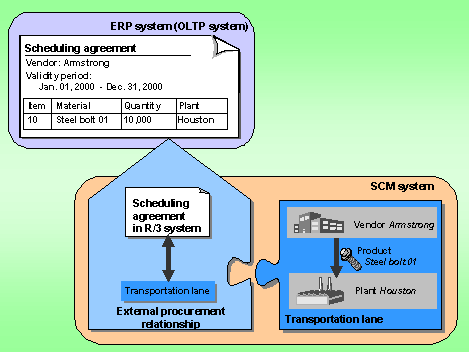
The product Steel bolt 01 can be procured by your Houston plant from the vendor Armstrong Co. The product is to be procured via a scheduling agreement that already exists in your ERP system.
In your SCM system, the link between the vendor Armstrong Co. (source location) and your Houston plant (destination location) for the product Steel bolt 01 is represented by a transportation lane. Furthermore, an external procurement relationship exists, creating a link between this transportation lane and the scheduling agreement in your ERP system.
Structure
An external procurement relationship contains the following data:
● General data
The general data includes information on the purchasing info record, contract, or scheduling agreement (for example, the procurement category, the logical system, the document number, the vendor and so on).
● Settings
Under Settings, you can see the planned delivery time of a material and whether the external procurement relationship is active or inactive.
○
Planned delivery
time
The planned delivery time is adopted from the ERP outline agreement. However,
you can change it.
In the source determination process, the system uses the planned delivery time
to calculate the scheduling of external procurement orders. If there is no
entry in the external procurement relationship, or the entry is zero, the
system uses the planned delivery time from the product master.
If you want the planned delivery time of zero from the external procurement
relationship to be taken into account in source determination, you must also
set the Take Into Account indicator.
Planned delivery times greater than zero are generally taken into account,
even if the Take Into Account indicator has not been set.
○
Deactivation of
external procurement relationship
An external procurement relationship is usually deactivated if the purchasing
info record, contract, or scheduling agreement is deleted in the ERP system.
If the external procurement relationship is inactive, it is no longer taken
into account in the source determination process and no new transportation
lanes can be created for it.
● Data on the transportation lane
On the Assigned Transportation Lanes tab page, you can display data on the transportation lanes and maintain the priority. You can also lock and unlock the assigned transportation lanes on this tab page.
● Scheduling agreement data (only in the case of APO scheduling agreements)
You can display, and in some cases maintain, the following data on the Scheduling Agreement tab page:
○ Settings
○ Transaction data
○ Delivery data
● Partners (only in the case of APO scheduling agreements)
On the Partners tab page, you can specify:
○ The address (for example, postal address, e-mail address) to which scheduling agreement releases are to be sent
○ The medium (for example, fax, e-mail) via which scheduling agreement releases are to be output
○ Which partner role your vendor assumes (here: source location)
If you have not maintained an address here, the SA release will be sent to the address maintained in the master data for the source location. The medium and the partner role are then determined from the default values maintained in Customizing for Supply Chain Planning under Collaborative Procurement ® Set Message Triggers.
You can also call up additional information by clicking one of the following buttons:
● Costs
This gives you more precise information on the product costs (for example, scale prices and their validity periods).
● Release Creation Profile (only in the case of APO scheduling agreements)
This takes you to Customizing, where you can display the release creation profile.
● SA Releases (only in the case of APO scheduling agreements)
Here you can display the scheduling agreement releases that have already been generated for a scheduling agreement item.
● PO History (only in the case of APO scheduling agreements)
Here you can view all the transactions and events that have been recorded for an item of a scheduling agreement (for example, receipts of goods and invoices).
● Display Last Deliveries (only in the case of APO scheduling agreements)
Here you can display an overview of the last inbound deliveries against a scheduling agreement item. The inbound delivery data is transferred from the OLTP system to the APO system.
Accessible Functions
You can also branch to the following functions (Environment ® <...>):
● Location
● Product
● Transportation lane
● Quota arrangement
● Tolerance profile, checking procedure, and confirmation profile for the receipt of confirmations (only in the case of APO scheduling agreements)
In Customizing, you can display the profiles and procedures for the receipt of confirmations.
● Enter confirmations (only in the case of APO scheduling agreements)
You go to the function for entering confirmations.
Integration
The external procurement relationship is directly linked to the relevant transportation lane and provides additional information about it. From the external procurement relationship, you can also branch directly to the transportation lane in order to maintain relevant data.
If your OLTP system is an ERP system, you can transfer purchasing info records, contracts, and scheduling agreements (and changes to these purchasing objects) to your SCM system via the core interface (CIF).
For more information on external procurement relationships see Process External Procurement Relationship.