 Application Group Assignments
An application group is a named set of strategy management users with access to certain tabs and application permissions.
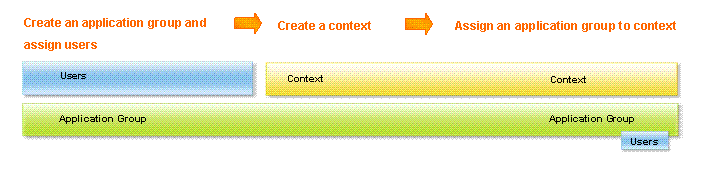
You assign application groups to a context to allow the users in the groups to access the context. Because each application group has a set of tabs and permissions assigned to it, when you assign an application group to a context, you are also applying the application group's permissions when using the context.
Any user who is a member of the application group assigned to the context can use the context in the application.
 Note
Note
The same users can be assigned to multiple application groups. For information about application groups, see Application Groups.
Note
You can hold off publishing a context and all of its components by not assigning any application groups to the context. Once you are finished creating all components, then you can assign an application group and make the context available in the application.
Prerequisites
You are an administrator or a user assigned to an application group with Create/Edit Contexts permissions. If Contexts is unavailable to you, it means you do not have the correct permissions.
You have created a context. For information, see Context Development.
Application Groups are created. For information, see Application Group Development.
Features
You can do the following when assigning application groups:
(Required) Select a context from the Context drop-down list to specify its application groups.
Review the Application Groups list to see all defined application groups. The highlighted application groups are the ones assigned to the selected context.
Select application groups who can access this context in the application, respecting the permissions set in Manage Application Groups in the Administration section.
Clear individual application groups from the context by clicking selected ones. Users who belong to an application group that has been cleared from a context can no longer access the context in the application. The application groups are still available to be assigned to other contexts.
Clear all selections from the context by clicking Clear.
Activities
To assign application groups to a context, choose Assign Application Groups from the Context section.
Example
If a user is a member of two different application groups assigned to a context, the user gains a superset of all of the user's group permissions when using that context. In this example, the executive and development groups are both assigned to Context A, and user Tom is a member of both the Executive application group and the Development application group. Therefore, user Tom can create scorecards and initiatives when using context A.
Application Group |
Executive |
Member |
User Tom |
Permissions |
Create scorecards |
Context |
A |
Application Group |
Development |
Member |
User Tom |
Permissions |
Create initiatives |
Context |
A |