Handling Incorrect Entries
In this section you learn how to output error messages if incorrect or incomplete user input is entered.
User input is not always correct. What is the best way to deal with this? How do you recognize incorrect input? What options do you have for handling errors when you create a BSP application? Is there an automatic function that you can use?
-
Basic knowledge of creating BSP applications
-
Basic knowledge of the Event Handlers, particularly OnCreate and OnInputProcessing.
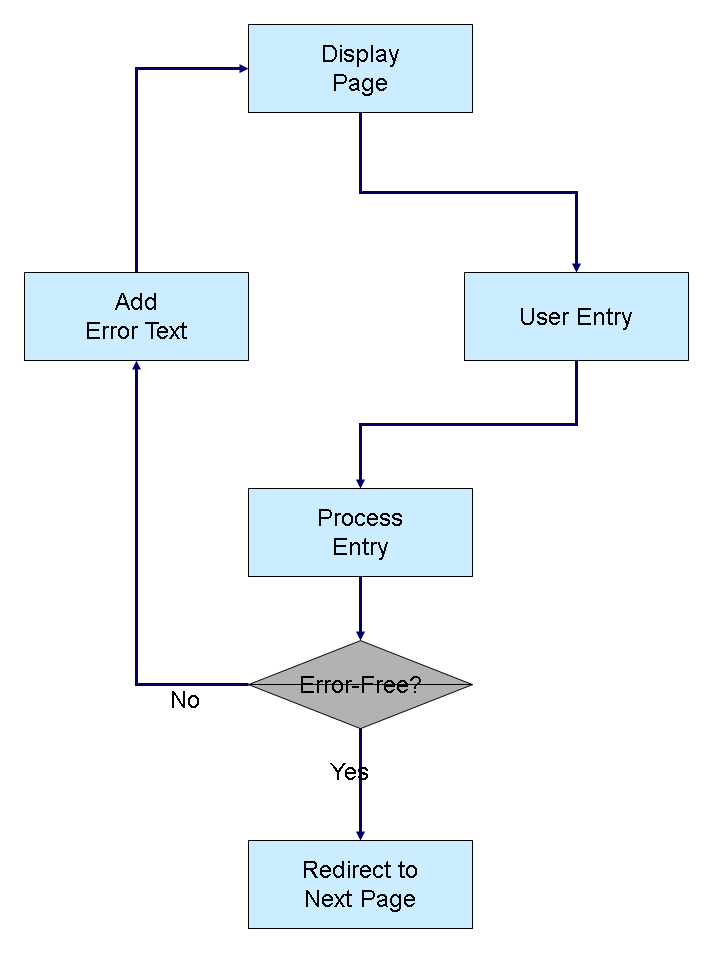
It is easiest to handle errors if they can be processed in the page itself. In principle, we recommend that the input is not sent to a different page, but that it lands on the same page. If the input does not have any errors, you can then navigate to a different page.
If there are errors, you can display the same page again with error messages.
This procedure works with both stateful and stateless applications (see also Stateful and Stateless BSP Applications).
To manage error messages, you can use the messages Object, which is available on every page. It contains a list of error messages with details of severity, condition, and the corresponding text. An entry is made in the list if syntax errors occur in automatic page attributes, for example, when the entry cannot be converted to a specific format. The attribute name must be available.
You can add entries to the messages object during input processing of the BSP application. Texts and conditions are user-definable in this case.
The processing process is as follows:
Outputting Error Messages of Auto Page Attributes describes how you handle error messages that were created by inputting auto attributes.
If you want to add your own error message, see Adding Error Messages.