
 Consolidation in a Consolidation
Location
Consolidation in a Consolidation
Location

Purpose
You can use this process to initially transfer products from different locations to a consolidation location. You can then deliver the products to your customer from this location. If required, you can deliver all products from the consolidation location to your customer on a specific date.
Using a consolidation location saves transportation costs, particularly if you deliver the products on one date. A consolidation location also simplifies the export process: You can transfer products from locations that do not deliver abroad to a consolidation location that does deal in export and delivers the products to the customer.
Prerequisites
· You have made the settings for consolidation.
· If you call Global ATP from SAP Customer Relationship Management (SAP CRM) and want to determine the consolidation location in SAP CRM, use SAP CRM release 5.0 or higher. You can also use Global ATP with consolidation with an earlier SAP CRM release.
Process Flow
...
...
1. The OLTP system triggers a rules-based ATP check in SAP SCM.
A consolidation location is defined in one or more of the determined rules.
If you call the rule-based ATP check from SAP CRM, you can alternatively specify a consolidation location in the sales order to start the consolidation. In this case, SAP CRM transfers the consolidation location to Global ATP. For more information, see SAP Library for SAP CRM under Components and Functions → Sales → Availability Check → Availability Check with SAP APO → Additional ATP Functions in Service Parts Management → Controlling the ATP Check in the Sales Order → Consolidation Location.
2. The system determines substitute location products.
3. To ensure that you can deliver the products on the customer’s requested delivery date, the system performs scheduling in several steps.
a. Scheduling step 1
Based on the customer's requested delivery date, the system determines the material availability date in the consolidation location.
b. Scheduling step 2
Based on the material availability date in the consolidation location, the system determines the material availability date in the source locations. The material availability date in the source locations is the date on which the products are delivered from the sources locations to the consolidation location.
The system checks the availability of the products.
i. The system first checks the availability of the products for the calculated material availability date in the consolidation location.
ii. If the system cannot cover the requirement in the consolidation location, it checks the availability for each calculated material availability date in the source locations.
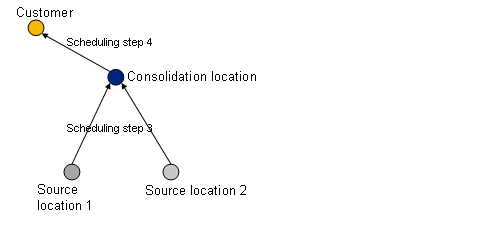
c. Scheduling step 3
The system determines the date of delivery to the consolidation location for each confirmed schedule line.
d. Scheduling step 4
The system determines the date of delivery to the customer. If you have activated the delivery date/time correlation for the consolidation location, the system determines a common delivery date/time for all products from the consolidation location to the customer.
The following figures illustrate the scheduling steps for consolidation:

4. The system transfers the information about the confirmations in the consolidation location to the OLTP system.
5. The system updates the sales order in SAP SCM and creates stock transport orders.