
 SAPOSCOL Log Files

Definition
The following files for the function of SAPOSCOL are stored in the Working Directory of SAPOSCOL :
● The file coll.put, in which SAPOSCOL writes the contents of its shared memory segment; this is performed only when SAPOSCOL is stopped and at user command
● The configuration file for monitoring selected processes, dev_proc (see Monitoring Selected Processes with SAPOSCOL)
● The file dev_filter that contains the file systems and hard disks that are not to be monitored by SAPOSCOL (see Deactivating Object Monitoring by SAPOSCOL)
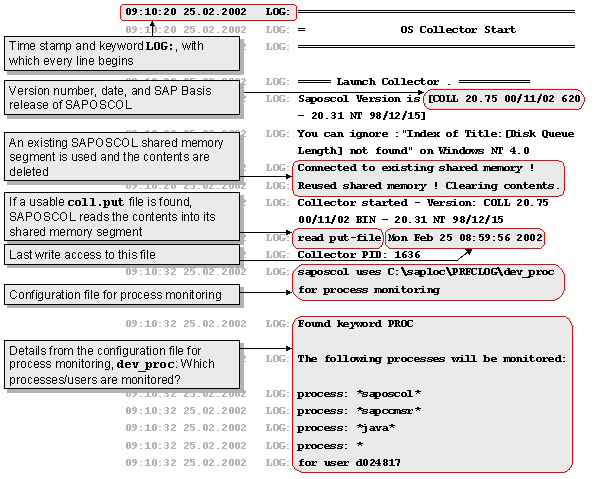
● The log file dev_coll that contains SAPOSCOL messages and the status of SAPOSCOL

During error analysis of SAPOSCOL, you should also check the file dev_coll.
● The log files dev_col1 and dev_col2, which are written with a cyclical trace when SAPOSCOL is started (command saposcol –z, see Controlling SAPOSCOL from the Operating System)
With the cyclical trace, the trace information alternately to the files dev_col1 and dev_col2 :
● The trace is first written in the file dev_col1
● When dev_col1 exceeds a set size, the trace is written to dev_col2. The size is 50,000 lines. This number is not configurable.
● When dev_col2 exceeds this size, dev_col1 is deleted and the trace is written to this file again.
This process is continuous. This ensures that the current trace is always accessible, without a trace file being able to grow to any size.
Example dev_coll
See also:
 Operating System
Monitor and Operating System
Collector SAPOSCOL start pages
Operating System
Monitor and Operating System
Collector SAPOSCOL start pages