
 Adobe Document Services Error Analysis

Problem Description
Problems with Interactive Forms based on Adobe might have different reasons. The intention of this document is to show you ways to get specific information to the causes.
|
Scenario Type: |
Error analysis |
|
NetWeaver Component: |
SAP Web AS, Adobe document services |
|
Validity: |
SAP NetWeaver ’04 >= SP Stack 12 SAP NetWeaver 7.0 >=SP Stack 4 |
Decision Roadmap
Prerequisites
You need to have access to the following systems:
● Web AS Java that hosts the Adobe document services (HTTP connection)
● Web AS Java that hosts the Java Web Dynpro application (HTTP connection), only for forms created in SAP Web AS Java
● Web AS ABAP that is used for the forms processing (SAP GUI connection), only for forms created in SAP Web AS ABAP.
In order to change configuration settings you need the appropriate user rights.
Main Tools
● Transaction SFP in Web AS ABAP (only for forms created in SAP Web AS ABAP)
● Visual Administrator
Analysis
The figure below gives you an overview on how to proceed, when an error occurred.
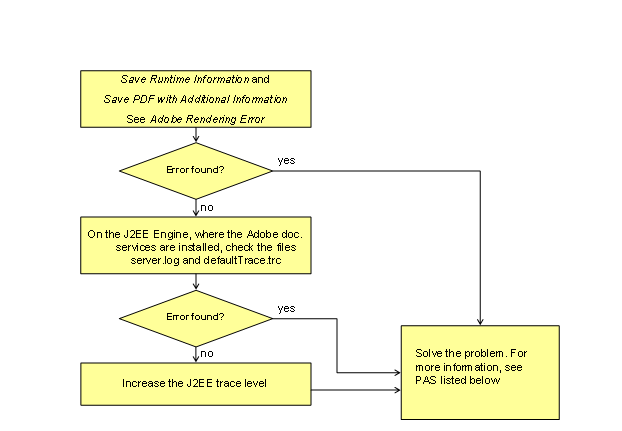

For getting this information, you have to restart your process after each of the following steps, e.g. printout of a form.
...
1. Follow the procedure as described in Adobe Rendering Error.
2.
If the error
details are not specific enough for solving the problem, you should check the
files server.log and defaultTace.trc on the J2EE Engine. For more information,
see
 Viewing
the Logs in the Adobe Document Services Configuration Guide.
Viewing
the Logs in the Adobe Document Services Configuration Guide.

This files apply both to forms in an ABAP environment and in a Java environment.
3. If the error details are not specific enough for solving the problem, you should increase the J2EE trace level.
For more information on solving specific problems, see the following documents:
● Adobe Connection Error - ABAP
● Adobe Connection Error - Java