
 Product Allocations Procedure

Definition
The product allocations
procedure determines how products are allocated. You can enter
location-dependent and location-independent sequences of product allocation
procedures in the
 location-specific
product master.
location-specific
product master.
Use
In product allocations, you can use two different methods to consume the order quantity against the product allocation quantity. You determine which method is used using the indicator for the product allocations method (cumulated). Multilevel steps of product allocation groups can be combined into product allocations procedures.
If an order is checked, every step (product allocation group) in the sequence is evaluated. The result of previous steps is copied to subsequent steps. In the product allocations procedure, the final result of product allocations is calculated from a logical “And“ combination, which is provided by each product allocation group.
Product Allocation Procedure Example
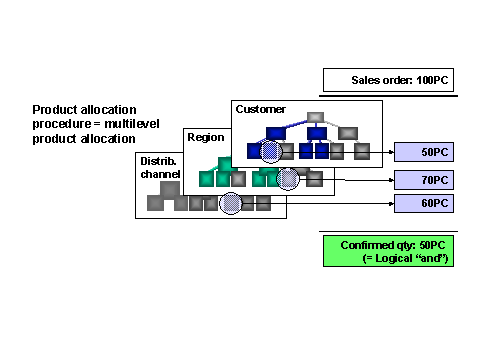
Structure
Discrete check
If you have not set the cumulated indicator, the method available since Release 3.0F is used for product allocations (discrete product availability check).
Using this method, the quantity from the sales document is consumed against the product allocation quantity. This is carried out on the basis of the product allocation quantities for current and future periods only (unused product allocation quantities from past periods are not taken into account).
Example
Product allocation quantities
January |
February |
March |
April |
May |
50 |
50 |
50 |
50 |
50 |
If an order is placed for 150 pieces on 03.01., the product allocations check proposes 50 pieces for March, 50 pieces for April and 50 pieces for May. The quantities still available in January and February are not taken into account.
If you use this method, the product allocations counter, with which you can define several product allocations steps using different product allocation groups, is not available. The only hierarchy step value allowed is 1.
Cumulated check
If you have set the cumulated indicator, the product allocations method available since Release 4.0A, which implements a checking logic of the cumulated product availability, is used. Using this checking logic, the quantity is consumed against the product allocation quantities still available. Unused product allocation quantities from past periods are included in the calculation of the available product allocation quantity for the current period.
Example
Product allocation quantities
January |
February |
March |
April |
May |
50 |
50 |
50 |
50 |
50 |
If a customer places an order for 150 pieces on 03.01, the unused product allocation quantities from past periods (50 pieces for January + 50 pieces for February) are cumulated and then 150 pcs of the available product allocation quantity are determined in the product allocations check. A total available product allocation quantity of 150 pieces is confirmed for the date.
Product allocations counter
You can define several product allocations steps using different criteria. The final confirmed quantity is the minimum quantity confirmed of the individual product allocations steps. You can carry out the following checks using this function:
1. step: Check order quantity against the plant capacity for the relevant periods
2. step: Check order quantity against the product allocation quantities allowed for the customer
Consumption period
The consumption period defines the number of periods before and after the check period. A product allocation group, which determines the criteria for selecting the product allocation time series, is assigned to the product allocations step in the sequence of product allocation procedures.
A product allocation group can be used for several product allocations procedures. All procedures, which have been assigned to a product allocation group, must have the same product allocations method. This means that a product allocation group supports either a discrete or a cumulated check. In addition, a product allocation group can only be used once in a procedure.
Masking indicator
You can specify a masking indicator for each product allocation group. The key for the general entries (= collective product allocations) is created from the masking indicator. Using the characteristics of collective product allocations function, you add general entries to the characteristics directory. A default entry is thereby created for each node in the hierarchy (determined by the sequence).

You must use the same masking indicator per product allocation group even if the product allocation group has been assigned to different procedures. For multiple assignments of a product allocation group, you can decide if a masking indicator should be used or not. However, differing masking indicators are not allowed for the same product allocation group.
Several objects with different validity periods can be assigned to the product allocations step. The validity periods do not overlap.
The relevant product allocations object is determined using the check date from the order as a basis.
The characteristics combination with the saved product allocations is determined using the product allocations object. Product allocations are not carried out in inactive validity periods. Nevertheless, for technical reasons involving the database, a product allocations object must be assigned in such instances even though it will not be taken into account.
Integration
The product allocation procedure is normally sent from the R/3 System. The settings for the procedure are then available in APO. A location-dependent procedure cannot be used since a procedure already exists for the check.
The product allocation procedure is then not sent from SAP R/3 if product allocation is switched off in SAP R/3. The ATP-based evaluation (product allocation yes/no) takes place in SAP APO first.
Evaluation of the product allocation procedure
APO Release |
Evaluation type |
APO 1.1 |
If no product allocation procedure is entered in the basic data screen of the material master in SAP R/3, no product allocation is carried out in APO 1.1. |
APO 2.0 |
If no product allocation procedure is entered in the material master, but the product allocation is switched on, the product allocation procedure is read from the SAP APO product master in SAP APO. The location-dependent procedure first, then the location-independent one. |
APO 3.0 |
The requirements class and the schedule line category in SAP R/3 can be used immediately to decide whether the procedure should be used from SAP R/3 or from SAP APO. In the IMG for Sales and Distribution choose Basic Functions → Availability Check and Transfer of Requirements → Availability Check → Availability Check Against Product Allocation → Define flow according to requirement category. In the IMG for Sales and Distribution choose Basic Functions → Availability Check and Transfer of Requirements → Availability Check → Availability Check Against Product Allocation → Define flow for each schedule line category. If product allocation is switched off in requirements class or schedule line category in SAP R/3, the procedure from SAP APO is used. If product allocation is switched on in requirements class and schedule line category in SAP R/3, the procedure from SAP R/3 is used.
|
See also:
Creating Product Allocation Procedures
Product Allocation in
Sales Order Entry
Product Allocation
Without Direct Check of Planning Area