
 Advanced Functions of the CCMS
agents
Advanced Functions of the CCMS
agents

Use
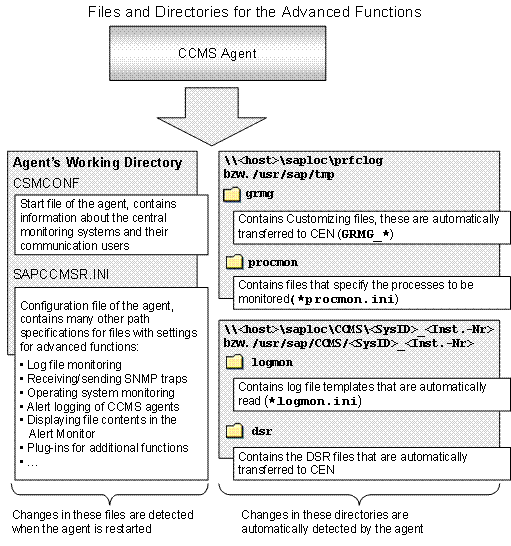
In addition to data transfer, agents also make entirely new monitoring functions possible within the monitoring architecture. To activate these advanced functions, you must usually create a corresponding configuration file and either reference this file in SAPCCMSR.INI: Configuration File for the CCMS Agents or copy them to the relevant standard directories that the agent monitors.
Changes in SAPCCMSR.INI only become active after the agent has been restarted (see Controlling CCMS Agents). Changes in the standard directories of the agent (logmon, procmon, grmg), on the other hand, are immediately detected and a corresponding monitoring function is started.
Features
● Monitoring Files with CCMS Agents
One of the functions of CCMS agents is monitoring files. You can use this log file agent, which is integrated into all agents, to monitor files (such as log files) for particular search patterns, the last change time, or for their existence. This means that you can search any text files for any text patterns, assign alerts to them, and display the results in the Alert Monitor.
● Monitoring Operating System Data with CCMS Agents
You can use a filter to explicitly remove subtrees or entire components from the operating system monitoring display. No monitoring nodes are then generated for these. As an alternative to filtering out file systems, you can activate an exclusive monitoring with which only the file systems that you explicitly specify are monitored. All other file systems are not then monitored.
● Event Log Monitoring with CCMS Agents
On Microsoft Windows platforms, you can monitor the Windows event log with CCMS agents.
● Alert Logging for CCMS Agents
You can define another log file for all CCMS agents that logs all alerts that the agent reports. This is especially useful if you do not use the CCMS Monitoring Architecture to display alerts (the CCMS Monitoring Architecture has its own logging), but want to use other system management tools that are to be based on the data from the CCMS agents.
● Interpreting a Text Attribute as a File Name/URL and Displaying Contents
Files or Web resources can be monitored with various monitoring functions of the monitoring architecture. The name of the monitored file is often displayed as a text attribute. To quickly display the contents of a file of this type or of a URL from the Alert Monitor, there are two analysis methods that display the contents of the file or the URL in a separate window.
● Registering with Multiple Central Monitoring Systems
● Transferring Distributed Statistics Records (DSRs)
It is the task of the CCMS agent to transfer Distributed Statistics Records to the primary central monitoring system CEN.
● Including Additional Functions in CCMS Agents
All CCMS agents can load shared libraries that use additional data suppliers to provide additional information to the central monitoring system. An example of this is an extension for monitoring the Internet Transaction Server (ITS) and cached disk subsystems, such as EMC Disc Arrays (Symmetrix). More information: SAP Note 420213.
 CCMS Agents start
page
CCMS Agents start
page