 Monitoring
Monitoring the SAP system helps the administrator to identify resource bottlenecks or problems early and to take action if required.
Getting Started
Monitoring a system landscape is a complex task of significant importance for every company that operates one or more SAP systems. The complexity increases with every additional system, component, or extension.
With the monitoring architecture of the CCMS (Computing Center Management System) and the SAP NetWeaver Administrator (NWA), SAP provides a flexible and universally-usable infrastructure with which you can monitor your entire IT landscape centrally, and which reports problems quickly and reliably.
The monitoring architecture is delivered with every SAP NetWeaver Application Server. The architecture runs on every SAP NetWeaver AS and can be easily extended to include additional SAP and non-SAP components.
The concept of the monitoring architecture is to make all required information available in a Central Monitoring System (CEN), and therefore to make administrators' work easier. Problems are displayed as soon as they occur; the log files can also be accessed from one location, which reduces the time required for error identification and correction. In this way, the monitoring architecture allows you to achieve greater efficiency with lower costs.
Technical System Landscape
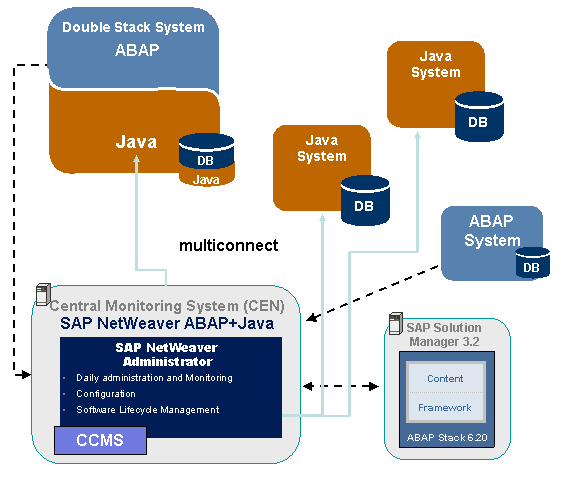
Java monitoring in AS Java is designed to take advantage of the CEN architecture. All the data that is written by the monitoring functions of the J2EE Engine can be easily transferred to the CEN and viewed via the NWA.
The figure below summarizes the monitoring functions of the J2EE Engine and shows the Central Monitoring System:
 Note
Note
Always use the SAP Solution Manager with the highest release for central monitoring.
Tools
For a list of the tools required, see Tools.
Tasks
For a list of the tasks that you need to perform regularly or when an alert occurs, see Tasks.
Trouble Shooting
The SAP NetWeaver Problem Analysis Guide (PAG) contains the following problem analysis scenarios for the various components of AS Java:
SAP Java Connector Problem Analysis Scenarios
NoteNote that this documentation is available in English only.
End of the note.