
 Defining Output Parameters and Result States

Prerequisites
● You have created an iView and defined its input parameters as described in Defining Input Parameters and Form Elements.
● The model is open in Storyboard.
Procedure
...
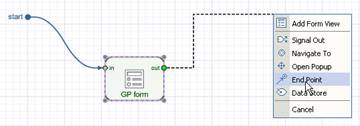
1. To define output parameters and result states, first you have to create the end points of the iView. Drag out from the out port of the GP form.
2. Release the mouse button and choose End Point from the context menu.

3. In the Select Output Fields dialog box select the parameters you want to export as output, for example Date of Approval, Date of Request, Name and Request.
4. By analogy, connect the GP form to a second end connector. This technique maps parameters automatically.
5. Select one of the end point connectors and add two more output parameters by clicking Add Field (plus) in the Output Parameters table of the Configure Element task panel:
○ ResultState_approve – type Boolean
○ ResultState_reject – type Boolean


These parameters are recognized by GP as result states of the callable object. There can be only two result states, since the parameters type is Boolean. To be able to export result states to GP, precisely follow the naming convention ResultState_<name of the result state>.
Result
You have defined output parameters and result states for the iView. To map the result states to the user controls you have created previously, see Configuring Events.