Executing Rule Determination

Purpose
The following section describes how the system finds a rule in the rules-based availability check.
Prerequisites
● You have made all the relevant settings for the rules-based availability check.
● You have configured the rules-based availability check in the check instructions. For more information, see the Implementation Guide (IMG) for SAP Supply Chain Management (SAP SCM) under Advanced Planning and Optimization → Global Available-to-Promise (Global ATP) → General Settings → Maintain Check Instructions.
● You have defined the business transaction in the Online Transaction Processing System (OLTP system).
You should be aware that the values of the technical scenario and the action type are hard-coded.
Process
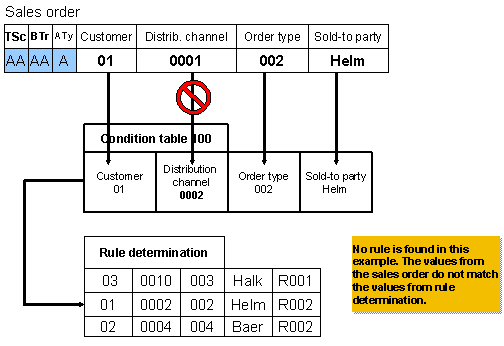
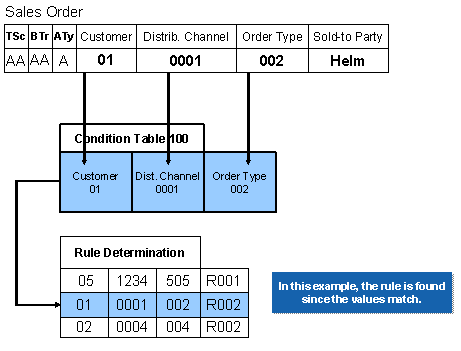
The sales order is entered in the OLTP system. The rules-based availability check is executed in SAP Advanced Planning and Optimization (SAP APO). The sales order contains values (for example, 01 (= customer), 0001 (= distribution channel)), and transfers the values of the three activation parameters (technical scenario, business transaction, and action type) to SAP APO.
...
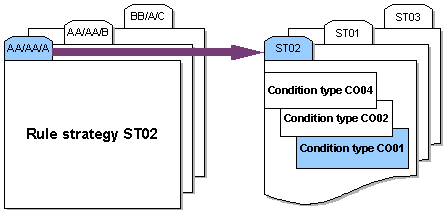
1. When these activation parameters are transferred to SAP APO, a rule strategy (ST02, for example) or a rule strategy sequence (STF1, for example) is found.
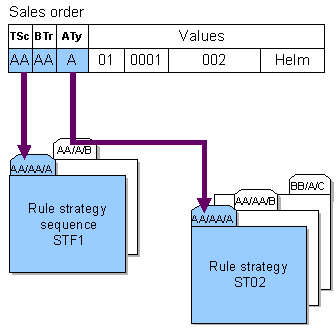
2. If a rule strategy sequence is found, this also links to one or more rule strategies.
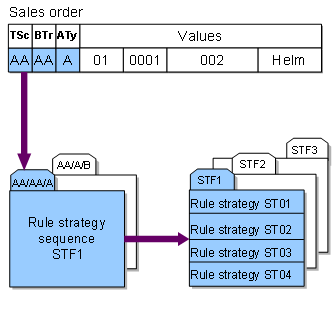
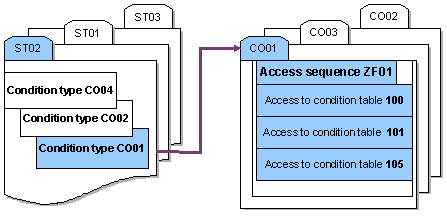
3. The rule strategy refers to one or more condition types.
4. One access sequence is assigned to each condition type. The access sequence contains a list of accesses to condition tables.
5. The system searches the condition tables for matching key combinations.
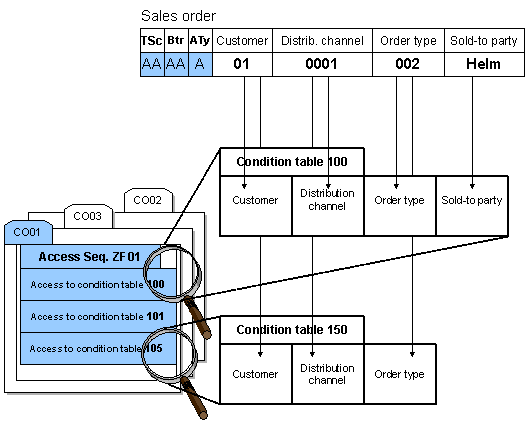
6. The rule (R002) is found while the values from the sales order are compared with the values from the condition tables.

Note that the fields have different formats in the ERP system and in SAP APO if purely numerical values are transferred from the ERP system to SAP APO. For example, the KUNNR field has 10 places in the ERP system. In SAP APO the field LOCNO has 20 digits. At runtime, the LOCNO field is filled with leading zeros. In order for a rule to be determined in this case, in the creation of the rule determination you must also create the value for the condition – which contains the KUNNR field – with leading zeros. Otherwise rule determination will fail.
For more information, see SAP Note 0188289.