 Process Variants in Collaborative Sales Forecasting
Purpose
You can run collaborative sales forecasting in two different process variants.
In the supplier-lead process variant, suppliers and customers share and compare sales forecast data to come to a consensus sales forecast. In this process variant, the supplier provides the leading forecast and determines the final consensus forecast. Since the leading forecast comes from statistical forecasting, the forecast data is calculated in weekly time buckets.
In the customer-lead process variant, the customer provides the leading forecast. The customer sends daily forecast data using XML messages of type ProductForecastNotification (PFN) or ProductForecastRevisionNotification (PFRN). The customer forecast pattern determines the disaggregation method. This process variant displays the forecast data in weekly buckets. However, it also allows you to view the customer and final consensus forecast data in daily buckets.
The customer can follow and even control planning by means of the customer view of the
Sales Forecast Details - Product View
screen, since the supplier owns the SAP Supply Network Collaboration (SAP SNC) system.
Prerequisites
For more information about the required settings for collaborative sales forecasting, see Settings for Collaborative Sales Forecasting .
Process Flow
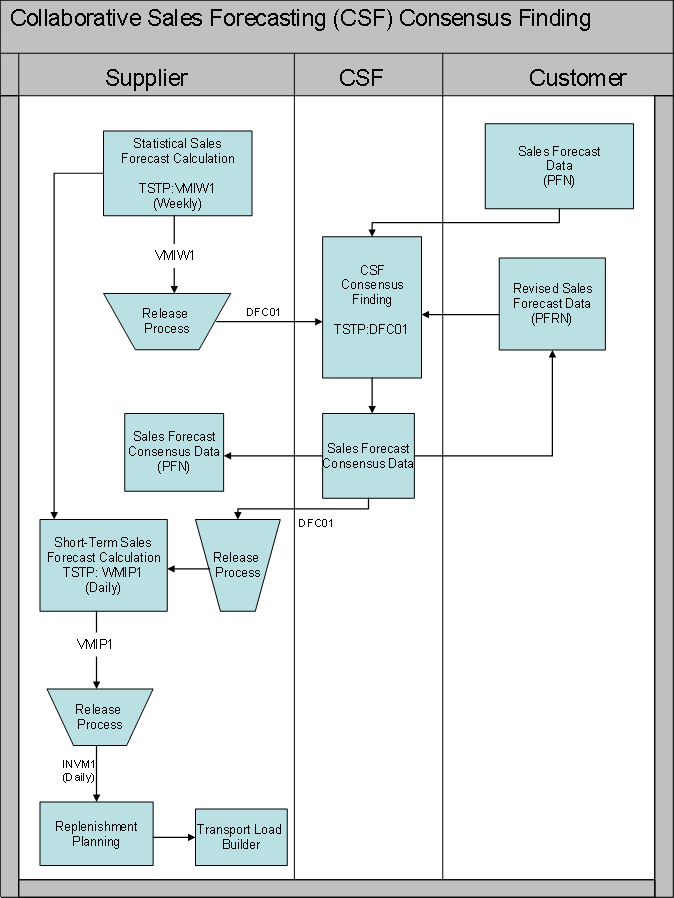
The process runs as follows:
A customer sends daily or weekly forecast data in the form of a PFN or PFRN XML message to CSF, and sends you a ProductActivityNotification (PROACT) XML message containing his or her daily sales forecast data.

In the supplier-lead process variant, the daily forecast data of the customer is aggregated and stored as weekly time buckets upon receipt in CSF. In the customer-lead process variant, the daily forecast data of the customer is stored as daily time buckets upon receipt in CSF.
You release your weekly statistical forecast data to CSF. For more information, see Demand Release .
In collaborative sales forecasting, the system displays the customer forecast data as well as the calculated forecast data from statistical forecasting in the following key figures:
Customer Baseline Sales Forecast
(displays customer forecast data received by means of PFN or PFRN XML message)
Supplier Baseline Sales Forecast
(displays supplier forecast data received from statistical forecasting)
Baseline Sales Forecast Difference
Baseline Sales Forecast Difference (%)
The system calculates the difference automatically.
In the customer-lead process variant, you can switch the display of the
Sales Forecast Details – Product View
screen to daily. You can then view the customer baseline sales forecast and the final consensus forecast on a daily time bucket level.
You run consensus finding. The system displays the results of the consensus finding in the following key figure:
Consensus Baseline Sales Forecast – Calculated
Based on the status levels (displayed as colors in the key figure cells) and the values displayed in the above key figure you can do one of the following:
If all values show expected or acceptable values, you can save the key figure
Consensus Baseline Sales Forecast – Calculated
. The system then copies the data into the key figure
Consensus Baseline Sales Forecast – Final
.
If values are over or below the expected or acceptable tolerance levels, you can manually modify the results in the key figure
Consensus Baseline Sales Forecast - Manual
to values you want to plan with, and save. The system the copies the data into the key figure
Consensus Baseline Sales Forecast – Final
.
When you save in the customer-lead process variant, the system disaggregates the final consensus forecast data back to daily time buckets. Disaggregation is based on the distribution pattern provided by the forecast data sent by the customer by means of PFN or PFRN XML messages.
For more information about setting tolerance levels, see Customizing for
Supply Network Collaboration
under
Basic Settings
→
Consensus Finding
→
Consensus Profiles
→
Maintain Consensus Quantity Profiles
For more information about color profiles, see Customizing for
SAP
Supply Network Collaboration
under
Demand
→
Define Color Profiles for CSF and OFM
You release the results from the key figure
Consensus Baseline Sales Forecast – Final
to short-term forecasting.