
 Monitoring the Status of the J2EE Engine Using
the CCMS
Monitoring the Status of the J2EE Engine Using
the CCMS

Use
You can monitor the status data of the SAP J2EE Engine from a central SAP monitoring system using the CCMS monitoring architecture. The data collected by the JMX monitors is sent to the central monitoring system using the CCMS connector and the CCMS agent SAPCCMSR. You can display the collected data in the Alert Monitor (transaction RZ20). If errors occur, alerts are triggered.
If you have assigned an auto-reaction method to the alerts, an automatism can take effect (such as notification if an error occurs).
Prerequisites
·
You
must have installed, registered, and activated the SAPCCMSR agent with the
–J2EE option. For more
information, see
 Installing an Agent on
a Java Instance (Java Standalone System) or
Installing an Agent on
a Java Instance (Double-Stack System).
Installing an Agent on
a Java Instance (Java Standalone System) or
Installing an Agent on
a Java Instance (Double-Stack System).
· Your central CCMS monitoring system must be a SAP Web Application Server ABAP 6.40.
Integration
The diagram below shows the route for monitoring data from the JMX monitor for the J2EE Engine to the SAP CCMS.
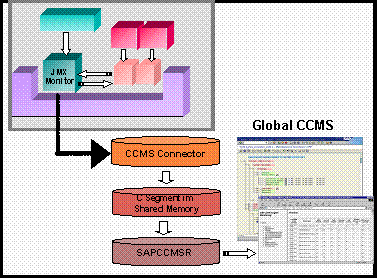
When the J2EE Engine starts, it creates the JMX monitors and provides them with data during its runtime. The monitoring data of the JMX monitors is mapped in CCMS. To do this, the CCMS Connector forwards the monitoring data from the J2EE Engine to the shared memory segment of the SAPCCMSR agent with the –J2EE option. The agent is part of the CCMS Monitoring Infrastructure. You must run the agent on every host on which a SAP J2EE Engine monitored by the CCMS is running. The agent is required even if the SAP J2EE Engine is running on the same host as the monitoring SAP System.
You can display the J2EE monitoring data in the central monitoring system using the CCMS Alert Monitor. To do this, open the alert monitor (transaction RZ20), and select SAP J2EE Monitor Templates. The status data is displayed in the following monitor views:
· The monitor view Engines displays status data for the kernel, services, performance, and system
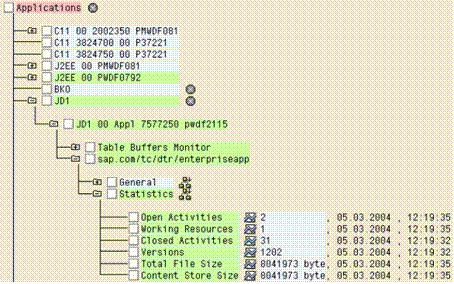
· The monitor view Applications displays application data

For information about the values transferred from the J2EE Engine status monitors to the CCMS, see the Monitored Data section of the J2EE Reference Manual.
Example
The figure below shows an example of J2EE status monitors in the Engines monitor view of the CCMS:
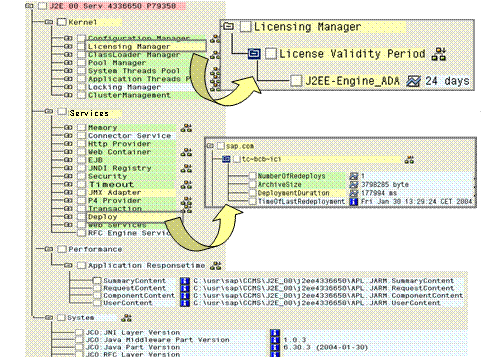
In the J2EE Engine’s status monitors, you can use the colors to tell at a glance where warnings (yellow) and errors (red) have occurred. If you open the tree at the corresponding points, you can learn more about the cause.
In the figure, License Manager is highlighted in yellow. This means that a warning has occurred. If you open the tree at this point, you can see that your license expires in 24 days. Under Services, Deploy is highlighted in yellow. This means that the deployment of at least one application has taken so long that a yellow alert was triggered. If you open the tree at this point, you can see the application to which this refers. You should check whether the deployment ran correctly, and whether the application is working correctly. You can use the Visual Administrator to check whether the deployment ran successfully. If the application has a check mark in the Deploy service under Application, it was started. The JARM data is displayed under Performance, and the operating system data under System.
The system displays monitoring data for J2EE applications that have implemented monitoring functions in the Applications monitoring view:
For more
information about the concept of the CCMS monitoring architecture and the
operation of the CCMS Alert Monitor, see
Alert Monitor. For
more information about the values transferred from the J2EE Engine status
monitors to the CCMS, see the Monitored Data
section of the J2EE Reference Manual.
You can set the threshold values for the status monitors in the Visual
Administrator or using the Alert Monitor of the central monitoring system
(CEN). To be able to change the status monitors from the CCMS Alert Monitor,
you require a corresponding RFC connection between the J2EE Engine and the
CCMS.
For more information, see the section Connecting a J2EE
Engine to the CCMS.