 4.2 Active Services in the ICF
The Internet Communication Framework (ICF) allows you to communicate with the SAP system using Internet standard protocols (HTTP, HTTPS and SMTP). Within the ICF tree, the NWBC runtime also has a node, by default on the path /sap/bc/nwbc. This node must be active to enable any NWBC client to access the server.
Below the nwbc node, there are a number of nodes, all of the format nwbc_*, that are used to limit access to specific services of NWBC. Detailed information on when these nodes should be active is provided in section 7.6 ICF Configuration.
In addition, the various cockpits are configured within the ICF. Each cockpit is defined as a subnode under /sap/bc/nwbc, for example /sap/bc/nwbc/solman.
A subnode must be active so that the cockpit can work.
Node |
Representation in Browser |
Description |
|---|---|---|
nwbc_launch |
/sap/bc/nwbc/~launch |
Transaction NWBC (started in the SAP GUI via /nNWBC) will display a launch page with a complete list of all available cockpits and all roles that the user has assigned via this cockpit. Effectively, the transaction just starts directly the nwbc_launch node of the NWBC. For security reasons, the ~launch page is controlled via the nwbc_launch node in the ICF tree and can be deactivated here. If this node is deactivated, then transaction NWBC will just start directly the NWBC for HTML client without allowing the user to select a specific cockpit; the access will be over all roles. |
nwbc_test |
/sap/bc/nwbc/~test |
This is an access channel that dumps in raw format all relevant trouble shooting information that could help in resolving a problem. The information from ~test includes the complete NWBC configuration, all roles assigned and a large number of user relevant information. When the NWBC creates a support ZIP file, it will also include all this information, if available. This node can be selectively disabled. Activate this node in systems of low security, as the additional trouble shooting information from the server can help extensively. For high security systems or systems directly exposed to the internet, it is recommended to disable this node. |
nwbc_testcanvas |
/sap/bc/nwbc/~testcanvas |
This node is used for internal development only. Therefore, it should be disabled on all productive systems. This is a test canvas which is loaded into the NWBC shell with a test role to test different APIs. |
nwbc_debug |
/sap/bc/nwbc/~debug |
This node is used for internal development only. Therefore, it should be disabled on all productive systems. This allows you to run an alternative $TMP runtime for quick troubleshooting purposes. |
exprt_sapportal |
/sap/bc/nwbc/~sapportal |
This node controls the activation of an API that can be used by the SAP NetWeaver Portal (>= SAP NetWeaver 7.02) to fetch role information for using dynamically in an enterprise portal. For more information, see 6.5 HTTP REST Based APIs and the portal documentation on NavigationTreeRequest. |
Customer Paths
It is best that application groups and customers do not work under the path /sap/bc. In such cases you can also create new paths: /myCustomer/.../nwbc/myCockpit.
For NWBC nodes, the CL_NWBC_HTTP runtime handler must be configured. Here also, access over the myCockpit node is monitored – it must be available and active.
In addition, the system logon must be configured. See also Namespaces and Naming Conventions.
BSP and Web Dynpro ABAP
For BSP or Web Dynpro ABAP applications in the Business Client, the relevant BSP/Web Dynpro ABAP-specific nodes must be active in the ICF service tree.
For more information on BSP settings, see Prerequisites in Administration of Business Server Pages
For more information on Web Dynpro ABAP settings, see Initial Configuration Settings in Web Dynpro ABAP Configuration and Active Services in SICF.
Activities
From the backend system, call transaction SICF.
Set the Hierarchy Type to SERVICE and click Execute (F8).
Expand the nodes under the default_host.
The cockpit subnode for the Business Client can be accessed by navigating down to the following service tree: default_host/sap/bc/nwbc
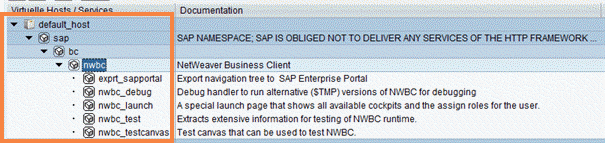 (Standard ICF service tree)
Select the relevant service node(s) and choose
 Service/Host
  Activate
  .
.