 4.9 Transaction NWBC
 (/nNWBC)
In each AS ABAP system you can call up a transaction code called nwbc. You can just start it with /nNWBC in the command prompt field.
This transaction code will start the ~launch URL in the browser, that is, a separate browser instance is started.
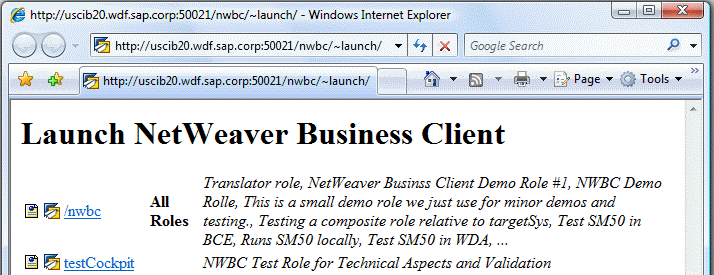 (Example of transaction NWBC)
The benefit of this function is that you do not have to look up HTTP ports, etc. Within the launch page, all configured cockpits on this system with the list of associated roles are displayed. All cockpits for which the user has no roles are filtered.
The first icon (or the link with the leading slash) will start NWBC for HTML
The second icon (or the link without leading slash) will start NWBC for the Desktop
The transaction NWBC uses the class CL_GUI_HTML_VIEWER to start the URL in the browser. This class will always start the URL with the Microsoft Internet Explorer (IE) installed, even if another browser is defined as the default browser. The reason for this is that the class contains additional logic to inject authentication information from the running SAP GUI session into the Internet Explorer (IE) instance when started, so that by default the browser will run with the same user name and client as the active SAP GUI session.
More information: ~launch, ~test and ICF Configuration