 Creating Rulesets
Procedure
In the Object Manager panel, under the Detail section, choose the Assigned Objects tab.
The Assigned Objects tab page appears.
Choose Ruleset from the Type field and choose Create Object.
In the Object Creation dialog box that appears, enter the following data:
Name
Short Text
Text
Choose Create & Navigate to Object.
The ruleset opens in the Object Manager panel.

Add a pre-condition to the ruleset.
You can add a new expression or an existing expression as the pre-condition.
 Note
NoteThe selected expression has to return a Boolean result.
End of the note.Assign a New Expression
Choose
 (Info Blank) next to the Detail section.
In the context menu that appears, choose
 Ruleset Operations
  Create Pre-Condition
  .
.In the Object Creation dialog box that appears, create the expression.
More information: Creating Expressions
Assign an Existing Expression
Choose
(Info Blank) next to the Detail section.In the context menu that appears, choose
Ruleset Operations Assign Pre-Condition .In the Object Query dialog box that appears, select the expression and choose Select.
The expression is added as the pre-condition.
Assign rules to the ruleset.
Choose
(Info Blank) next to the Rules section.In the context menu, choose Add Rule at First Position.
A rule is added.

Choose
Rule Operations Show Rule Details The rule details are displayed.
Choose Enable Rule and enter the time period for which the rule is to be valid.
Choose
Rule Operations Show Condition .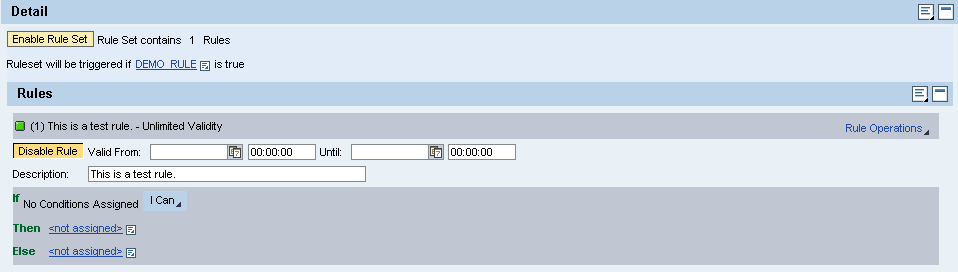
To insert another rule, choose
Rule Operations Insert Next Rule .
Save the ruleset.