
 Creation of SDA and SCA Archives

Use
You perform the following steps when you create SCA and SDA archives:
...
1. Creation of the EPA archives in the portal
If you perform an export within portal administration, individual portal content objects are combined into an archive with EPA format. See also the section Creation of an EPA Archive for the Portal Export.
In this scenario, note that the EPA archives do not contain PAR archives. When transport archives are created, portal applications (executable Java code, packed into PAR archives) are clearly distinguished from portal content objects (roles, worksets, or pages, combined in EPA archives) during export.
2. Creation of PAR and EAR archives in the development environment
Portal applications are treated as part of the Java Enterprise applications and you therefore combine them into PAR archives within the development environment. PAR archives can be combined into modules within archives with EAR format (Enterprise Archive). Different J2EE applications can be combined in EAR archives, for example PAR applications and Web Dynpro applications.
3. Creation of SDA and SCA Archives
Within the development landscape of
the SAP NetWeaver Developer Studio, you can also use both EAR and EPA archives
within the SAP
 Software Deployment
Manager for deployment to the portal. To do so you must add certain
metadata to these archives for software logistic purposes and convert them to
other formats.
Software Deployment
Manager for deployment to the portal. To do so you must add certain
metadata to these archives for software logistic purposes and convert them to
other formats.
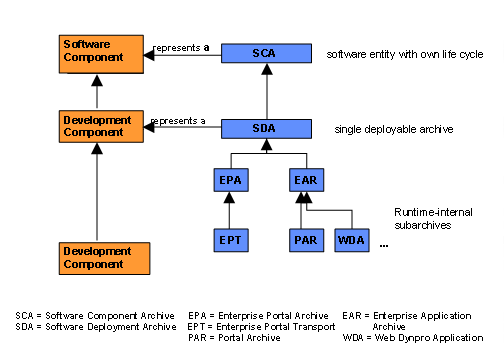
EAP and EPA archives must first be combined into SDA archives. The Software Deployment Archive (SDA) is the delivery format for SAP applications in programming languages other than ABAP, for example applications of the J2EE Engine. It is an archive format that is compatible with ZIP and that can be used as a container for other archives. The SDA contains the manifest information, that is package-related data of the contained archive (e.g. jar, war) and an SAP manifest containing additional information about the software logistics. Larger entities can be created in SCA format in the second step from the different SDAs. A Software Component Archive (SCA) is the physical representation of a version of a software component. It contains a selection of SDAs that describe a precise version. Updating an SCA always results in a new version of the software component.
The conversion to SDA and SCA formats make it possible for the archives to be deployed to the portal with the SAP Software Deployment Manager. See also Deployment with the SAP Software Deployment Manager. This replaces the import function of the portal for portal content objects.
Command line ‚Make’ utilities are provided for the conversion. You can download them from the support page of SAP Enterprise Portal.
The following graphic shows how you can combine objects in archives:
Features
The following conversions are possible:
· PAR to EAR
· EPA to SDA
· EAR to SDA
· SDA to SCA
Activities
You can find the ‚Make’ utilities in the portal with System Administration → Support → Support Desk. Click on the top-level area for Transport. The SAP ‚Make’ utilities are provided for downloading under the test and configuration tools.
For information about installing and using the command line ‚Make’ utilities, see Note 696084.