 Portal Catalog
The Portal Catalog provides a central access point to the content stored in the Portal Content Directory (PCD) and the possibility to store, manage and organize the content in a structured hierarchy.
Features
The Portal Catalog is a structured collection of folders containing the following content object types (in the framework of the Portal Content Studio):
Templates (iViews, pages, systems, and layouts only)
iViews
Pages
Layouts
Worksets
Roles
Business objects and operations
 Note
NoteThe Portal Catalog supports other portal editors and tools not associated with the Portal Content Studio. In the framework of these additional editors, the Portal Catalog supports other objects types, such as systems, portal desktops, portal themes, and rule collections. The basic features of the Portal Catalog are the same for all editors in which it is integrated.
End of the note.The Portal Catalog does not display child objects that are assigned to other parent objects (see examples in the following figure). For example, iViews assigned to a page, or pages assigned to a role. To access and view child objects, you need to first open the parent object in its respective editor; the child objects are then displayed in the Object Editor area.
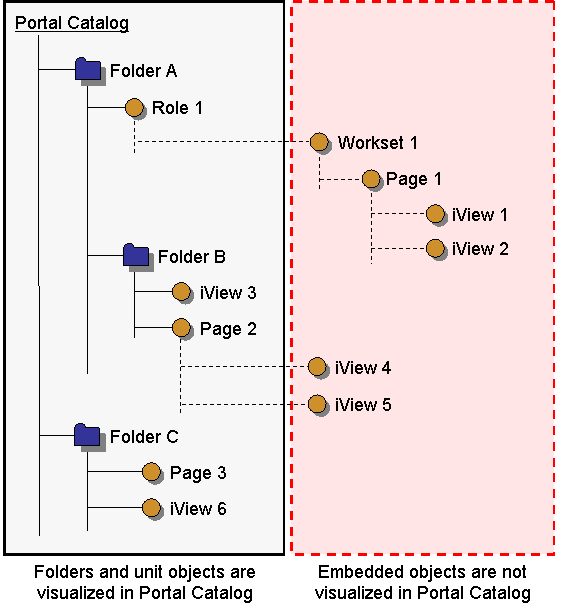
The Portal Catalog provides a single location and a consistent framework for creating and editing objects through the creation wizards and objects editors.
The manner in which the catalog is structured is completely up to the content manager defining the tree; for example, according to a particular business or organizational scenario.
Administration permissions can be delegated on the structure so that the content displayed is filtered according to the permissions assigned to the specific portal administrator viewing the Portal Content Studio.
Users can perform various actions and operations on objects in the Portal Catalog by right-clicking or double-clicking objects. For more information about editing and manipulating objects displayed in the Portal Catalog, see Managing Objects in the Portal Catalog.