 Workflow for Portal Display Configuration
This topic summarizes the recommended steps that need to be performed to set up portal displays suitable for your business environment.
Prerequisites
You have access to the following portal tools in the administration environment:
Tool |
Default Navigation Path |
Target Objects |
|---|---|---|
Portal Content Studio |
|
Framework pages (and other objects such as roles and iViews) |
Theme Editor (note that additional theme-related tools are available, to which you may need access) |
|
Portal themes |
Portal Desktop Editor |
|
Portal desktops |
Portal Display Rules Editor |
|
Rule collections |
 Content Administration
  Portal Content
You also need the appropriate portal permissions to access and maintain the relevant portal objects in their respective editors. For more information, see Portal Permissions.
Process
The typical workflow for setting up the appropriate portal display for your environment is as follows:
Create a framework page to define the layout of navigational and content-based components in a portal desktop. See Creating and Editing a Framework Page.
Create portal themes to define the look and feel of a portal desktop. See Creating Themes in the Theme Editor.
Create a portal desktop by combining the framework pages and portal themes. See Creating and Editing a Portal Desktop.
Create portal display rules to assign portal desktops to users. See Defining Portal Display Rules.
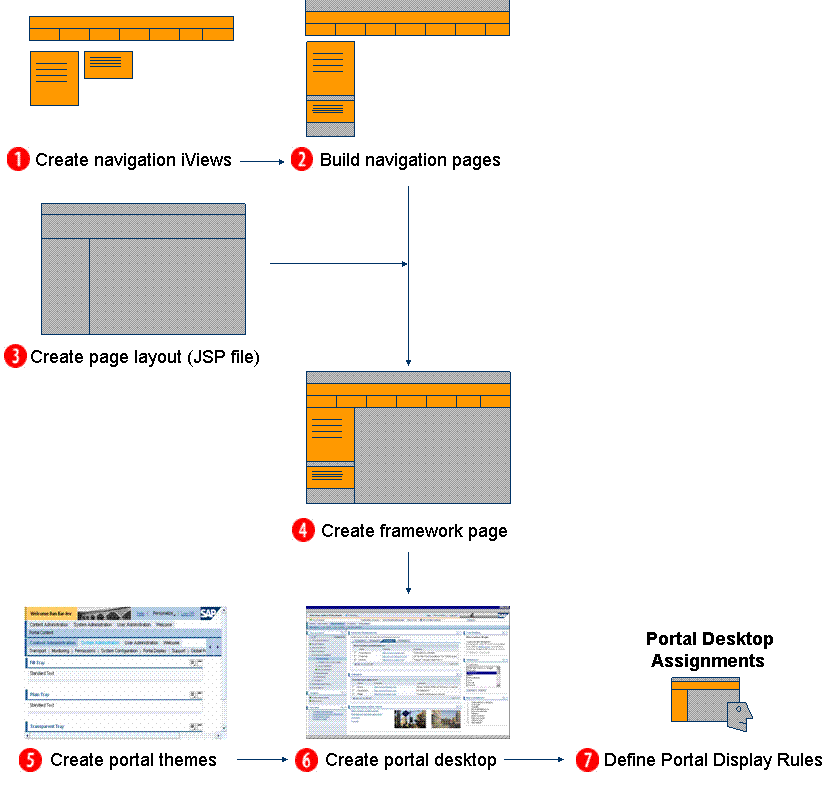
Portal desktop: design and assignment