 Portal Display Rules (Rule Collections)
A set of conditions defined by a portal administrator determining which portal desktops (a portal object combining selected framework pages with portal themes; see Portal Desktops) are assigned to portal users at runtime in SAP NetWeaver Portal. This allows organizations to allocate portal desktops with varying designs, branding, or layouts to different departments, subcompanies, or platform-specific scenarios.
Display rule definitions are transparent to portal users. At logon, users are seamlessly presented with the appropriate portal desktop assigned to their role, group, user, or scenario.
The following examples describe some scenarios that may require the need for alternative portal desktops:
Internal employees versus external customers and partners
Users accessing the portal through a dial-up connection (requiring a thin client desktop) versus broadband connections
Subcompanies belonging to the same organization (requiring different company branding in the portal header)
Display rules can be a combination of platform configuration and user-specific rules, by specifying the following:
Type |
Description |
|---|---|
Names of users, groups, and roles |
This method of portal desktop assignment to users is direct. You are stating exactly which users will receive each desktop. |
Connection bandwidth, browser type, browser version, and portal URL aliases |
This type of portal desktop assignment to users is indirect. You are not specifying a particular user directly, but stating a configuration that may correspond to any user. |
Structure
Portal display rules are defined as portal objects known as rule collections. A rule collection comprises a set of conditions, constructed by IF and THEN expressions, which together provide a means for assigning portal desktops to users at runtime.
A rule collection comprises the following components:
An IF statement on its own is referred to as an expression. Likewise, a THEN statement on its own is referred to as an expression.
The segments that make up an IF or THEN expression are referred to as parameter, operator, and value.
A combination of one or more nested IF expressions with a single THEN expression is collectively referred to as an IF-THEN condition or just condition.
A combination of one or more conditions is collectively referred to as a rule collection.
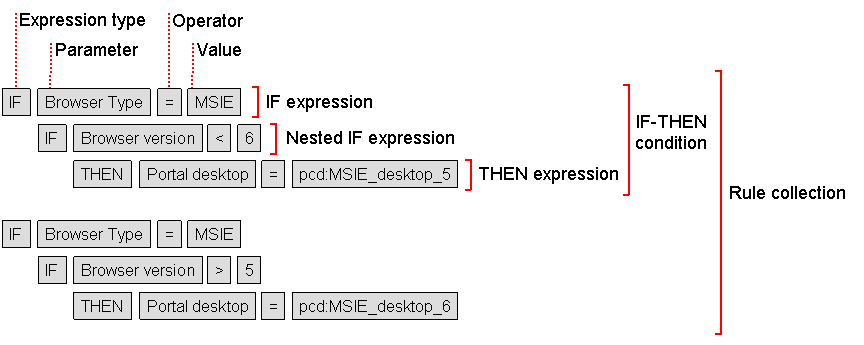
Rule collection: the components comprising an IF-THEN condition.
The possible parameters that you can assign to each IF and THEN expression, per expression, are as follows:
IF parameters |
THEN parameters |
|---|---|
|
|
Integration
The portal runtime determines the appropriate desktop assignment for each user logging on to the portal. The assignment is based on conditions defined in the default rule collection object, named Master Rule Collection (main_rules). See Master Rule Collection.
You can create additional rule collection objects and delegate them to different administrators in your organization. Each administrator is responsible for defining the display rules for their specified rule collection object by assigning portal desktops to users and use cases in their suborganization.
 Caution
The portal runtime starts with the Master Rule Collection object. Additional rule collection objects must be added as nested conditions in the Master Rule Collection object for them to take effect.
If at runtime, the portal is unable to resolve a portal desktop for a given user based on the defined display rules, the Default Portal Desktop is automatically provided. See Default Portal Desktop.
Rule collection objects are stored in the Portal Content Directory (PCD). You use the Portal Display Rule Editor to create and edit rule collection objects. See Defining Portal Display Rules.
Caution
Display rules do not determine which portal content (iViews and pages) is assigned to portal roles, nor does it determine the roles and groups to which users are assigned. For more information, see Role Editor and Workset Editor and Assigning Roles to Users and Groups.
You can include predefined portal URL aliases as part of your display rules. For more information, see Portal URL Aliases.
Prerequisites
Before you define specific portal display rules, we recommend that you first generate the necessary framework pages, portal themes, and portal desktops.
Example
The following diagram illustrates how portal display rules are resolved at runtime:
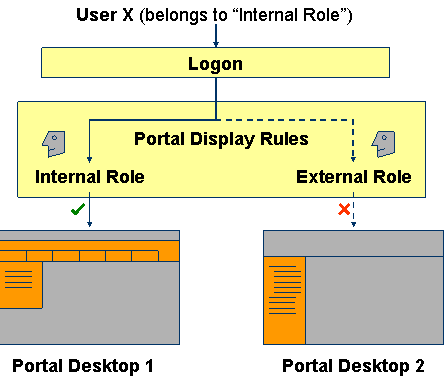
Portal Display Rules: Runtime activity upon user logon