
 Adding Transport Packages to NWDI

Portal transport packages can be added to the NetWeaver Developer Infrastructure as transport development components, enabling you to automate the deployment of portal content.
Each transport package is represented by one transport development component. The build of a transport development component produces an .sda file; when deployed, this .sda file imports content into the portal.
For more
information, see
 Working with
the Design Time Repository.
Working with
the Design Time Repository.
Prerequisite
● You created a transport package using the portal’s administration tools. For more information, see Creation of an EPA Archive for the Portal Export
Procedure
...
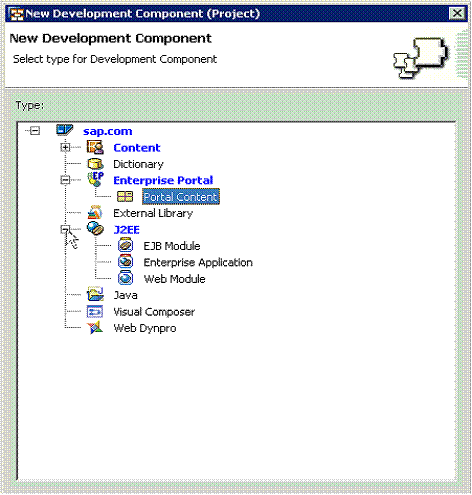
1. In NetWeaver Developer Studio, create a development component of type Enterprise Portal → Portal Content.
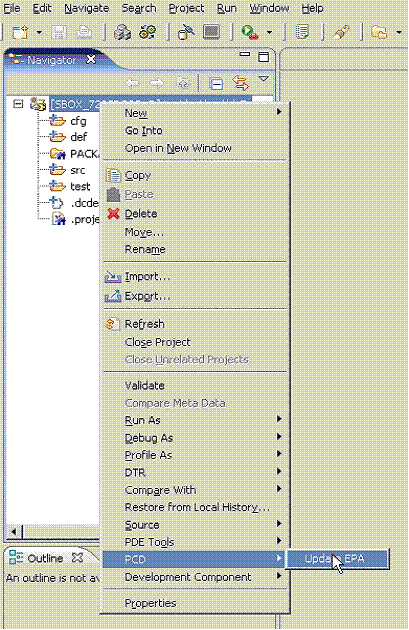
2. In the Resource perspective, right-click the development component project, and select Update EPA.
3. In the open file dialog, select the transport package (.epa file) to add to the development component, and click Finish.
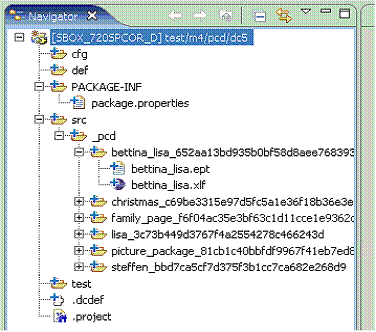
The files are added to the development component. For each portal object, one folder is added in the srcfolder, as in the following example:
4.
Check in, activate
and release the development component files. For more information, see
Working with the
Design Time Repository.
The development component can now be built and deployed.
Updating the Development Component
You can update the development component with an updated version of the .epa file by repeating Steps 2-4 above.
When updating the development component, the following occurs:
● All new objects in the updated .epa file are added to the development component, and are checked out (for add).
● All objects in the development component that are also in the updated .epa and that were modified are overwritten, and are checked out (for edit).
● All objects in the development component that are not in the updated .epa are deleted, and are checked out (for delete).