
 'Remote Role Assignment' Mode

Description
Using this content usage mode, a user administrator on a consumer portal can assign users and groups directly to roles residing on a remote producer portal. At runtime, users assigned to those roles receive the role's content directly from the producer when they log on to the consumer portal.

Remote role assignment is available only to NetWeaver portals.
Advantages and Disadvantages
Advantages |
Disadvantages |
● Content management, maintenance, and configuration by administrators is kept to an absolute minimum—the entire role structure is defined and configured by a content administrator solely on the producer portal. The user administrator on the consumer portal needs only to assign users to the remote roles. ● A portal (producer) can share its roles with other portals and is not required to assign them to remote users; the user administration on the remote portal (consumer) is responsible for this task. ● Runtime execution of the entire remote role structure including the portal applications of pages and layouts is performed on the producer portal. |
● Content administrators on the consumer cannot modify the content in a remote role. ● When a content administrator on a producer modifies a role that serves remote consumers, the administrator must be sure that the content is applicable to the business users on the remote sites. |
All the capabilities that are not possible with remote role assignment (listed above as Disadvantages) are available if you copy remote roles as remote delta links. For more information, see 'Remote Delta Link' Mode.
Basic Administration Workflow on the Consumer Portal
...
1. The system administrator defines a connection to the producer portal and registers itself.
2. The user administrator connects to the producer portal and searches for its portal roles.

Before a consumer can perform a remote role assignment, the content and system administrator on the producer portal must first configure certain portal permissions to expose its roles and to allow the background processes to complete successfully during the remote role assignment. For more information, see Exposing Roles on the Producer for 'Remote Role Assignment' Usage.
3. The user administrator assigns users and groups to the remote role.
More information: Consuming Roles by Remote Role Assignment
Technical Aspects
In remote role assignment, the consumer at runtime recreates the navigation structure of the entire role on the consumer portal. The consumer then executes the role's content (which includes the portal components and applications for all iViews, pages, and layouts) on the producer portal.
Since the producer and consumer share the same user base, users can also log on to the producer portal directly and receive the same role from it.
The following figure illustrates the design time and runtime aspects of remote role assignment:
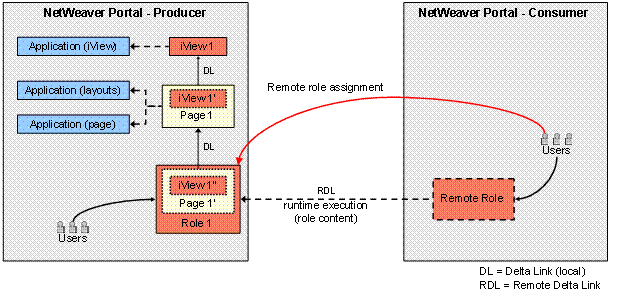
Figure: Remote role assignment. On the producer portal, Role 1 exists as a local entity (note that it can support its own local users). The role contains Page 1', which is a delta link to Page. iView 1'' (in Page 1') is a delta link to iView 1' and then to iView 1. At design time, the user administrator on the consumer assigns users to the remote role. When these users log on to the consumer portal at runtime, the navigation structure of Role 1 is generated on the consumer and the execution of the role's content, including its pages, iViews, and applications, takes place on the producer portal.
Note the following:
● To improve runtime performance of remotely assigned roles, the portal offers caching services and a persistence mechanism. For example, the consumer caches the navigation structure of a remote role; if the cached content is valid at runtime, the consumer skips the request for the role's structure and does not recreate it. For more information, see Federated Portal Caching.
● Since the role structure is generated on the consumer, you can configure the roles so that remote roles from the producer merge with local roles from the consumer in the top-level navigation at runtime. For more information, see Merging Navigation Nodes and Defining the Sequence.
● In order for the flow of data throughout the federated portal network to be seamless, you need to configure a number of systems and settings that are related to single sign-on authentication. For more information, see Single Sign-On.
● Once a consumer has assigned users to a remote role, the producer must not change the ID of the role or move the role to a new PCD location; otherwise the remote role will no longer function.
● The producer can change the role name; the name is updated in remotely assigned roles on the consumer once the UME cache is updated.
● When a role is deleted on a producer portal, all remote role assignments to that role on their respective consumer portals are automatically removed. For more information, see Setting Up Trust Between You and Consumers.
The following figure provides a more detailed view of the runtime flow of content retrieval and rendering starting at the client (business end user) for remote role assignment:
